
NewStorm 2.7 — User Guide
Last updated: 2026-07-27
Overview
NewStorm 2.7 is an Expert Advisor (EA) designed to navigate market volatility with ATR-based grid spacing, dynamic lot allocation, smart drawdown reduction, trailing stops, and news-triggered entries. It supports Continuous, News, and Manual trigger modes and includes an on-chart panel for manual control and live status information.
Configuration Recommendations
Before changing individual parameters, keep these principles in mind:
- Risk management: Grid trading involves risk. Adjust Initial Lot Size, Lot Multiplier, Max Lot Size, and Maximum Trade Per Batch to match your risk tolerance.
- Volatility: Enable Adapt Grid Size To Volatility and configure the ATR inputs if you want grid spacing to respond to market conditions.
- News direction: NewStorm opens news batches only when News Direction is armed. Always verify the Positive and Negative intentions shown on the panel before live trading.
- Time and day filters: The trading-time window restricts new Continuous and Manual batches. The day filter restricts all new batches. Neither filter stops management of an existing basket.
- Panel interaction: The on-chart panel is always displayed. Use its buttons to open or close Manual baskets and its status area to verify the next event and news direction.
Installation
Follow the standard MQL5 product installation guide for first-time setup. If you received the EA directly from Trade't, use the Trade't tool installation guide.
A. General Settings
| Parameter | Description |
|---|---|
| EA Comment | Used in logs, safety notifications, and EA identification. MT5 position comments use the basket format described below instead of this text. |
| EA Magic Number | Identifies NewStorm positions. Use a unique value when running more than one EA configuration on the same account or symbol. |
| EA Trigger Mode | Grid Trigger Mode starts Continuous baskets automatically. News Trigger Mode starts baskets from configured economic releases. Manual Trigger Mode starts baskets only from the panel's Open Buy and Open Sell buttons. |
| Print Log | Adds NewStorm's detailed runtime messages to the Experts tab. |
Automatic Basket Recovery
Basket recovery is automatic; Manage Old Trades is no longer an input. On initialization, NewStorm recovers positions that match both the chart symbol and EA Magic Number.
MT5 position comments use:
BasketID_Type_TradeNumber
| Type | Meaning |
|---|---|
C | Continuous |
N | News |
M | Manual |
For example, 42_C_3 identifies trade 3 in Continuous basket 42.
Changing timeframe or inputs, recompiling the EA, or restarting MT5 preserves the identity of an active Continuous basket. Historical Continuous positions with mixed basket IDs retain their original comments, but NewStorm manages positions in the same direction as one Continuous basket and uses a canonical basket ID for future trades.
B. Logging Settings
| Parameter | Description |
|---|---|
| Log Verbosity | Sets the minimum severity written by NewStorm. Use a more detailed level while diagnosing a setup and a quieter level during normal operation. |
| Repeated Log Cooldown Seconds | Limits how often the same recurring condition is logged, reducing repeated messages without hiding the first occurrence. |
C. Trading Settings
| Parameter | Description |
|---|---|
| Allow EA to take Buy | Permits NewStorm to open buy trades. |
| Allow EA to take Sell | Permits NewStorm to open sell trades. |
| Maximum Trade Per Batch | Sets the maximum number of positions in one basket. |
| Initial Lot Size | Sets the lot size of the first position in a basket. |
| Virtual TP (Points - 0 not used) | Sets a virtual take-profit distance in points. 0 disables it. |
| Virtual SL (Points - 0 not used) | Sets a virtual stop-loss distance in points. 0 disables it. |
| Max Spread Allowed (Points - 0 not used) | Blocks a new entry when the current spread reaches or exceeds this limit. 0 disables the check. |
| Distance Filter (Points - 0 not used) | Before starting a basket, checks positions with the same symbol and Magic Number. If an open price is within the configured distance of the current price, the new basket is skipped. 0 disables the filter. |
| Allow multiple Batches | When false, only one basket may be active. When true, Number of batches allowed sets the maximum. |
| Number of batches allowed | Sets the maximum number of simultaneously active baskets. |
| Activate Trailing Stop | Enables trailing-stop management. |
| Profit in points to activate trailing stop | Sets the profit required before trailing begins. |
| Trailing step in points | Sets the distance used when advancing the trailing stop. |
Lot Size Example — $100,000 Account (1% Risk per Full Grid)
| Variable | Value |
|---|---|
| Risk Budget | 1% of $100,000 = $1,000 |
| Grid Spacing | 200 points |
| Pip Value (XAU/USD) | $1 per point per standard lot |
| Levels (N) | 10 |
| Multiplier (m) | 1.5 |
| Broker Minimum Lot | 0.01 lots |
Calculation steps:
- Total drawdown per 1 lot (j = 1–10):
[1.5^(j-1) × (10-j+1) × 200]≈ 63,998 points - Exact initial lot:
$1,000 ÷ 63,998≈0.0156 lots - Rounded lot:
L0 = max(0.01, ceil(0.0156/0.01) × 0.01) = 0.02 lots - Worst-case drawdown:
0.02×2000 + 0.03×1800 + … + 0.93×200≈ $1,506 (1.51%)
Takeaway: With a 0.01 minimum lot, this example starts at 0.02 lots. The estimated worst-case drawdown is approximately $1,506 (1.51%). Adjust spacing, multiplier, or risk percentage to suit your target.
D. News Trigger
| Parameter | Description |
|---|---|
| News Provider | Selects the calendar source. MQL5 News is the default and recommended provider. Investing.com is available as the legacy provider. |
| News Refresh Period in Seconds | Sets the interval between release checks and retry attempts. |
| Max retry to ignore news | Sets how many release checks NewStorm performs before the event is timed out and skipped. |
| Currency | Selects the single currency whose events NewStorm will trade. Exactly one currency must be selected. |
| News Direction | Selects how positive and negative news outcomes map to Buy and Sell entries for the chart symbol. See the four choices below. |
| Parameter | Description |
|---|---|
| News to consider | Optional comma-separated event-name filters. Names must match the selected provider's event titles. |
| News to ignore | Optional comma-separated exclusions. Names must match the selected provider's event titles. |
| High Impact News (None not used) | Sets the color for high-impact event markers. None hides them. |
| Moderate Impact News Color (None not used) | Sets the color for moderate-impact event markers. None hides them. |
| Low Impact News Color (None not used) | Sets the color for low-impact event markers. None hides them. |
| Number of retries to download news | Sets the number of calendar download failures allowed before an error notification is sent. |
| Send Error/Safety Notifications | Sends notifications for direction warnings, calendar failures, and Hard Stop events. |
Currency Selection
Exactly one currency must be selected. ALL is no longer supported. A saved settings file from an older version that contains ALL will fail initialization until you select a specific currency.
News Provider
- MQL5 News — default and recommended. It uses MetaTrader 5's native MQL5 Economic Calendar, so no external calendar URL is required in MetaTrader settings.
- Investing.com — legacy provider retained for compatibility with older setups.
The News to consider and News to ignore text must match event titles from whichever provider is selected.
News Direction
| Choice | Behaviour |
|---|---|
| Auto from symbol currencies | Uses the broker's symbol base/profit currency metadata to determine direction. For example, XAUUSDx can be mapped safely when the broker reports XAU/USD. |
| Positive news: Buy symbol | Arms an explicit mapping in which a positive result buys the chart symbol and a negative result sells it. |
| Positive news: Sell symbol | Arms an explicit mapping in which a positive result sells the chart symbol and a negative result buys it. |
| Disable news entries | Deliberately disarms new News entries. Existing baskets remain managed. |
If Auto cannot verify the relationship between the selected currency and the chart symbol, the panel displays NOT ARMED, NewStorm alerts the user, and no new News basket is opened. Instruments such as US2000 or BRENT may require an explicit direction because their broker metadata does not always expose a verifiable currency relationship.
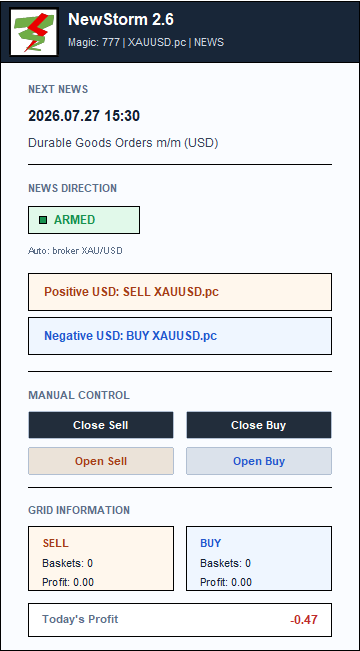
Example for XAUUSDx when USD is the selected currency:
- Positive USD: SELL XAUUSDx
- Negative USD: BUY XAUUSDx
Release Retries and Calendar Safety
News Refresh Period × Max retry determines how long NewStorm waits for a scheduled release. For example, a 2-second refresh period and 30 retries produce a wait window of approximately 60 seconds.
A release that arrives after this window or times out is skipped. NewStorm does not execute it later after the calendar recovers.
When MQL5 Calendar data becomes unreliable:
- new News batches are blocked;
- existing baskets continue to be managed; and
- processing resumes automatically when reliable calendar data returns.
Push Notifications Setup
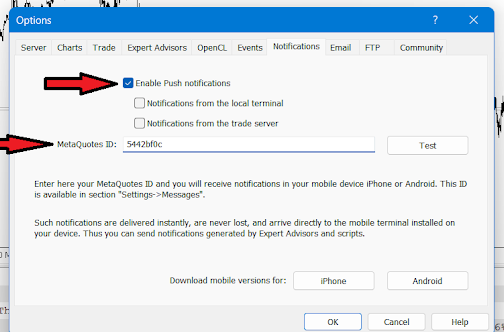
Enable MT5 push notifications under Tools → Options → Notifications, then enter the MetaQuotes ID from the MetaTrader mobile app. Use MT5's Test button to verify delivery.
Backtesting News
News-event backtesting is supported with an exported MQL5 Economic Calendar snapshot; see Section K. Extreme live conditions such as spread widening and slippage are not reproduced with the same realism in MetaTrader's strategy tester.
E. Trading Time
| Parameter | Description |
|---|---|
| Set Time to trade | Enables a broker/server-time window for starting new Continuous and Manual baskets. |
| Start Hour (0–23) | Sets the hour when the trading window opens. |
| Start Minute (0–59) | Sets the minute when the trading window opens. |
| End Hour (0–23) | Sets the hour when the trading window closes. |
| End Minute (0–59) | Sets the minute when the trading window closes. |
The Trading Time window blocks new Continuous and Manual baskets outside the configured hours. It does not block News baskets, and it does not stop grid additions or management of an existing basket.
F. Days Filter
| Parameter | Description |
|---|---|
| Limit New Batches By Day | Enables day-based entry filtering using broker/server time. |
| Trade Monday? through Trade Sunday? | Selects the days on which NewStorm may start a new basket. |
Limit New Batches By Day controls when NewStorm may start a new Continuous, Manual, or News basket. It does not stop management of an existing basket. Grid additions, exit logic, trailing stops, drawdown reduction, and manual closing continue on disabled days.
G. Grid Essential
| Parameter | Description |
|---|---|
| New Candle | When enabled, NewStorm checks for grid additions on a new candle. When disabled, it checks on every tick. |
| Lot Multiplier | Multiplies the lot size for each subsequent grid trade. |
| Max Lot Size | Caps the calculated lot size of an individual grid trade. |
| Grid Distance (Points) | Sets the base distance between grid entries. |
| Adapt Grid Size To Volatility | Uses ATR to adjust grid spacing to market volatility. |
| Tolerance | Multiplies the ATR value used to calculate dynamic grid distance. |
| ATR Period | Sets the ATR lookback period. |
| ATR Timeframe | Sets the timeframe used for ATR calculation. |
H. Dynamic Grid
This section can override the base distance and lot-size progression from Grid Essential as a basket develops.
| Parameter | Description |
|---|---|
| Enable dynamic allocation | Enables dynamic adjustments to lot size and grid distance. |
| Start after trade number | Sets the trade count after which dynamic allocation begins. |
| Factor to adjust distance | Multiplies grid distance after the threshold is reached. |
| Factor to adjust lot size | Multiplies the subsequent lot-size calculation after the threshold is reached. |
I. Smart Drawdown Reduction
| Parameter | Description |
|---|---|
| Enable drawdown reduction | Closes the first and last trades together after the configured threshold, provided their combined profit meets Minimum Profit (Money). |
| Agressive DD reduction | Repeatedly pairs an older trade with a newer profitable trade while the drawdown-reduction process is active. |
| Start after trade number | Sets the trade count at which drawdown reduction may begin. |
| Minimum Profit (Money) | Sets the minimum combined profit required before a pair is closed. |
DD Reduction Comparison
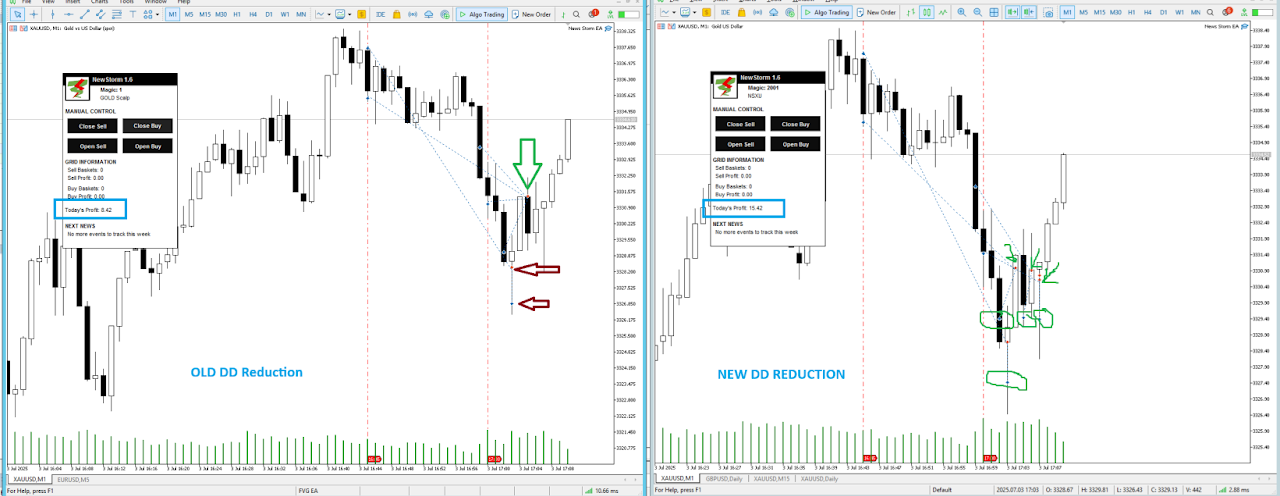
The image below compares the standard and aggressive drawdown-reduction mechanisms. The standard method closes the oldest trade with the newest and lets trailing logic manage the remainder. Aggressive mode can repeat the pairing process as qualifying trades become available.
J. Hard Stop
Hard Stop is a global safety mechanism that pauses NewStorm after the configured loss threshold is reached.
| Parameter | Default | Description |
|---|---|---|
| Enable Hard Stop | false | Enables Hard Stop. |
| Use % of Balance (false = fixed money) | true | Uses a balance percentage when true or a fixed account-currency amount when false. |
| Hard Stop % of Balance | 5.0 | Sets the maximum loss as a percentage of balance. |
| Hard Stop fixed amount (account currency) | 100.0 | Sets the maximum loss as a fixed monetary amount. |
| Cooldown period in hours before EA resumes | 24 | Sets how long NewStorm pauses before it may resume after Hard Stop activates. |
K. Backtesting
NewStorm supports backtesting news-driven strategies by replaying an exported MQL5 Economic Calendar snapshot.
Setup
CalendarV2.bin, and run a news-aware backtest.Backtesting Limitations
Keep these limitations in mind:
- Scheduled event times and historical release behaviour may not reproduce live arrival timing exactly.
- Broker execution in live conditions differs from simulation.
- MT5 does not model news-driven spread widening with full realism.
These differences have an even greater effect on scalping configurations.
Panel Reference
The NewStorm panel is always displayed and includes Manual controls, basket counts, profit information, the next event, and news-direction safety status.
The News area is arranged as follows:
- NEXT NEWS
- Event date/time
- Event name and currency
- NEWS DIRECTION
- ARMED, NOT ARMED, or INACTIVE
- A smaller explanation of the status
- Blank spacing
- Positive direction row
- Negative direction row
The direction rows use colons, for example Positive USD: SELL XAUUSDx. In non-News trigger modes, this section displays INACTIVE.
Video Tutorials
Video tutorials are available on the Trade't documentation and product pages.
Disclaimer
The products and software provided by Trade't are tested in certain market conditions and technical environments. Trade't is not responsible for loss, error, or misuse of the software. Test NewStorm in the Strategy Tester and on a demo account before using it with real money. The decision to trade live remains solely the user's responsibility and risk.
Past performance does not indicate or guarantee future performance. Forex and CFD trading involve a significant risk of loss. Always perform your own due diligence before making an investment decision.
NewStorm
$199
Add this product to your Trade't basket and complete payment securely through Mitalio.