FVG Pro is highly configurable - you can build strategies based on market structure and Fair Value Gaps as entry criteria. Using a basic strategy like the ones explained below is already very consistent. For traders who want to configure their own setups, the parameter depth lets you adapt to many approaches.
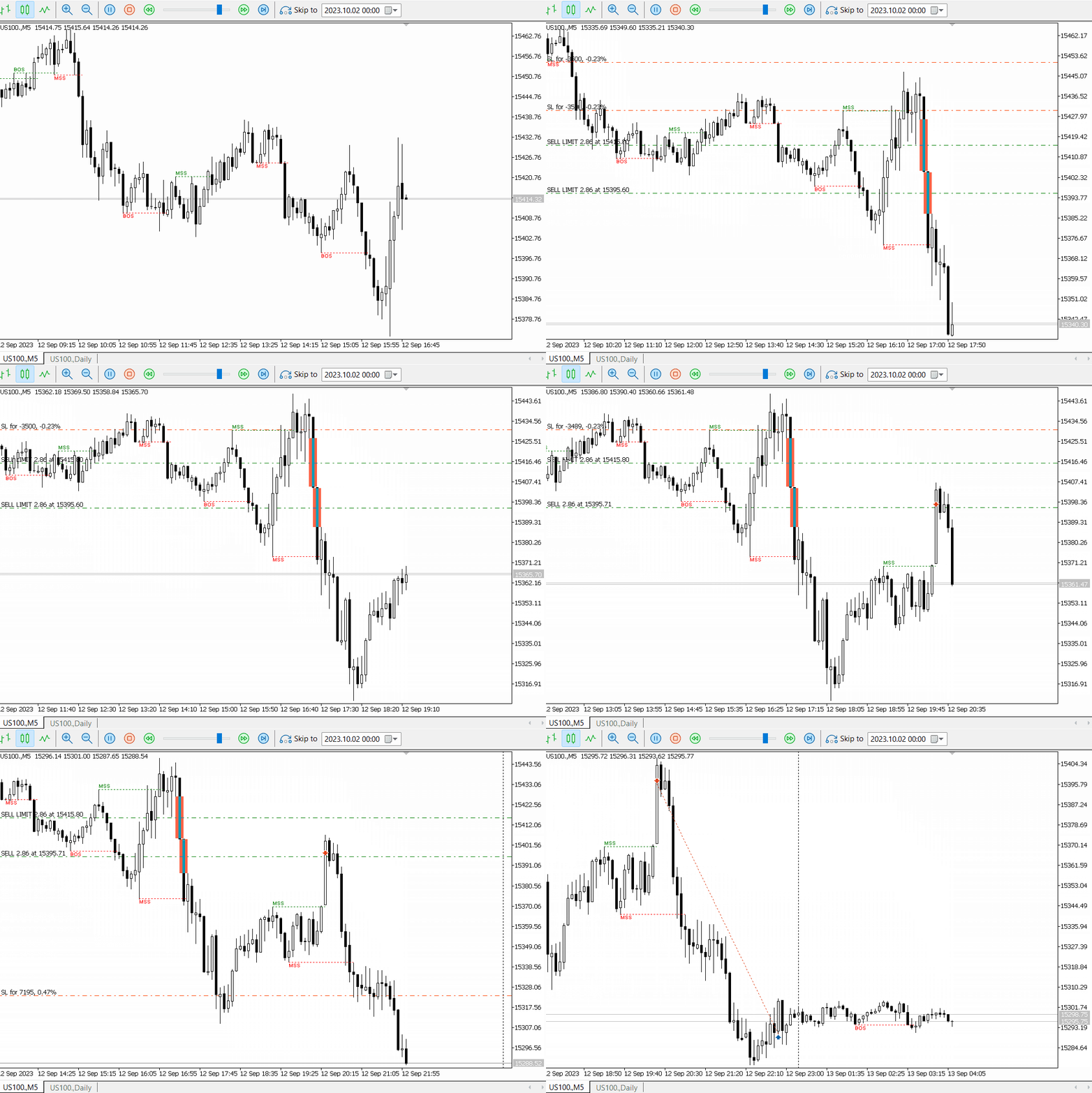
Trade scalp or intraday positions by triggering trades within a specific kill zone window. An advanced trailing stop helps book profit when the trade moves in your favour. In the example below, USTEC is traded in the Silver Bullet window of the New York Open — the framework trades with the daily trend and opens a trade on each FVG.
Swing Trade Strategy
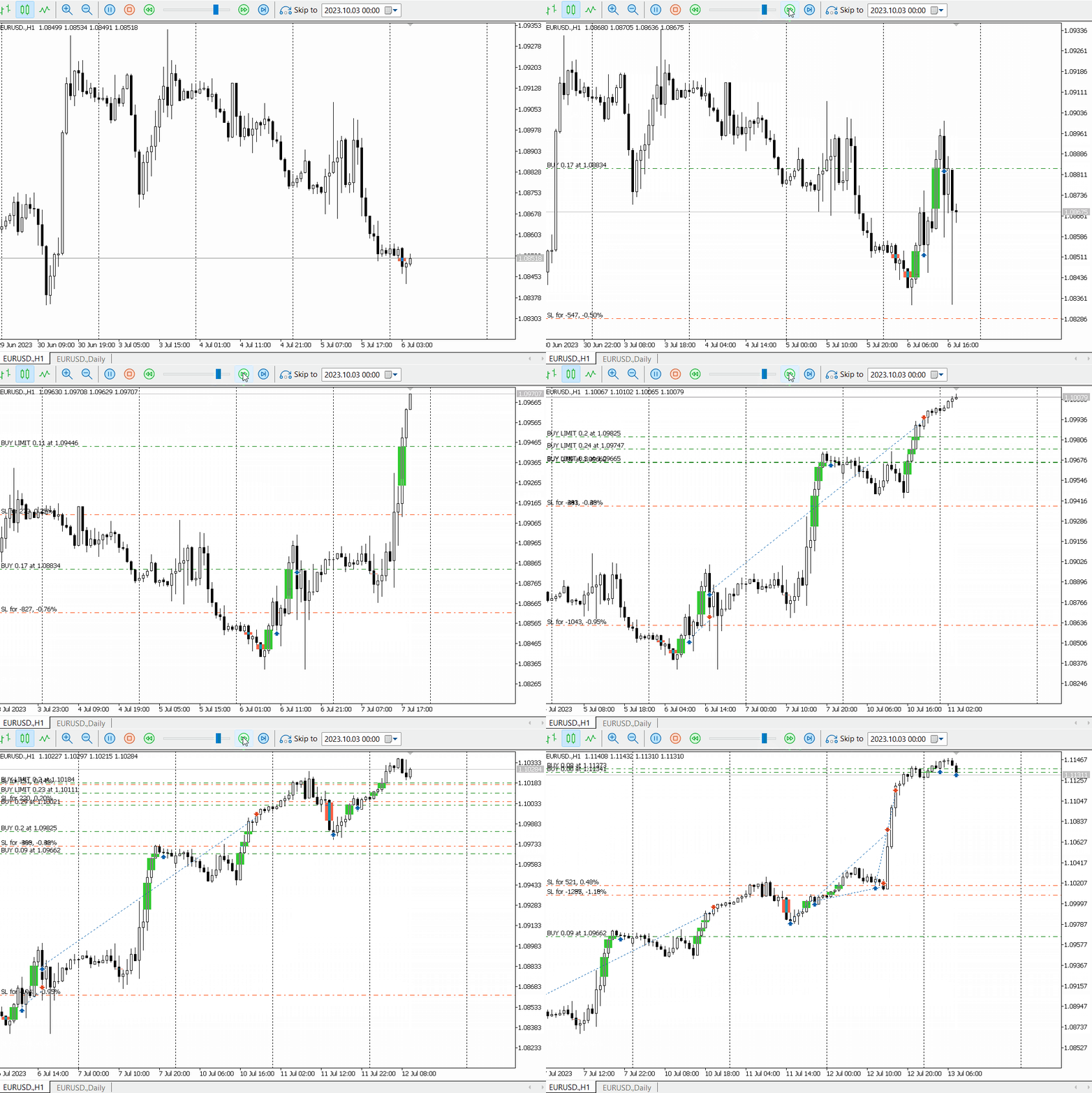
Switch to a higher timeframe and trade with the trend for multi-day swing trades. In the example below, EURUSD is traded on the H1 timeframe using the daily trend as bias, with FVGs as entries.
A. General
Parameter
Description
Magic Number
Unique identifier for this tool's orders. Use a different number for each framework running on the same account.
Trade Comment
Used as a comment on trade orders, and to identify logs in the Experts and Journal tabs.
Price Action Frequency
Defines whether price action checks (Breakeven, Partial TP, Trailing Stop) run on every tick or on each new 1-minute candle.
Activate Tool Panel
Enables the on-chart panel showing daily stats, current trend, structure, and basic controls (close trades, delete orders).
Hide Unnecessary Logs
Reduces log output to the minimum needed.
B. Trading Window
Parameter
Description
Trade only in defined kill zone
When false, the framework trades all day. When true, trading is restricted to the kill zone hours below.
Kill Zone Start Hour (0–23)
Hour when the kill zone begins.
Kill Zone Start Minute (0–59)
Minute when the kill zone begins.
Kill Zone End Hour (0–23)
Hour when the kill zone ends.
Kill Zone End Minute (0–59)
Minute when the kill zone ends.
Kill Zone Color
Colour of the kill zone shading on the chart.
C. Trade Settings
Parameter
Description
Allow Buy
When true, buy trades are taken when criteria are met.
Allow Sell
When true, sell trades are taken when criteria are met.
Limit Orders on FVG
Opens orders as limit orders, usually at the extremity or middle of the FVG.
Stop Orders After FVG
Opens orders as stop orders on the high/low of the candle following the FVG.
Trade at Market Price
Useful for low-timeframe or high-spread instruments (e.g. BTC) where limit/stop orders may fail. Enables market-price entries.
Recalculate Trade on Market Price
Recalculates SL, TP, and risk based on the actual market price received.
Order expiry in minutes (0 = disabled)
Sets an expiration time for pending orders. Set to 0 to keep orders indefinitely.
Max trades per session/day
Maximum number of trades to open per session or day. Considers active positions, pending orders, and trades already closed during the session.
Max Simultaneous open trades
Limits the number of trades open at the same time — useful for drawdown control.
Rotate Orders on new FVG
When max trades are reached and a new FVG appears, the most distant pending order is deleted and replaced with one on the new FVG.
Don't open new trade if previous in loss
When true, no new trades are opened if a previous trade is still in loss.
D. Entry Settings
Parameter
Description
Enter On
Where to place the entry relative to the FVG: Extremity FVG (edge), Middle FVG (midpoint), Beginning FVG (near side), MSS price within FVG Candle High/Low (confluence of FVG candle and MSS/BOS), or MSS price within FVG High/Low (Breaker Block confluence).
Apply Price Shift to Entries
Shifts the entry price away from or closer to the FVG by the pip value below.
Shift value in pip
Distance in pips to shift entry from the FVG. Use negative values to shift away.
Use Current Timeframe Market Structure
Tracks BOS and MSS on the current timeframe — only buys in bullish structure, only sells in bearish structure.
When true, trades only start after a confirmed BOS.
Don't Trade Over Extension
Prevents trading when the trend has broken structure too many times.
Over Extension Break Count
Number of structure breaks before declaring overextension.
Use Higher Timeframe Market Structure
Don't use filter, Trade with the trend (ideal for swing or post-NY open), or Trade Counter trend (useful for pre-London / London session).
HT MS Timeframe
The higher timeframe used for structure analysis.
HT MS Depth
ZigZag depth for higher timeframe market structure.
Use Trend Filter
SMA-based bias filter: Don't use filter, Trade with the trend, or Trade Counter trend.
Trend Timeframe
The higher timeframe from which bias is read.
Trend Loopback
Number of candles used to confirm the current trend direction.
E. FVG Settings
Parameter
Description
Minimum size in pip of FVG to Consider
Filters out very small FVGs. Set to 0 to consider all FVGs.
FVG Maximum size in pip (0 = disabled)
Filters out very large FVGs. Set to 0 to apply no upper limit.
Use 3 candles in a row FVG
Only considers FVGs formed by three consecutive bullish or bearish candles.
Ignore the first X FVG
Skips the first X FVGs after the kill zone opens — useful to avoid the very first candle of a session.
F. Position Exit Settings
Parameter
Description
Close positions at a certain time
When true, all open trades are closed at the defined time.
Hour to Close Positions (0–23)
Hour at which all positions are closed.
Minute to Close Positions (0–59)
Minute at which all positions are closed.
Close Opposite position on opposite structure break
When true, all buy trades are closed after X bearish structure breaks, and vice versa.
Number of Breaks before closure
MSS + BOS count required before positions are closed.
Close Opposite position on HT MSS
When true, buy trades are closed if a bearish higher timeframe MSS occurs.
G. Order Exit Settings
Parameter
Description
Delete Orders at a certain time
When true, all pending orders are deleted at the defined time.
Hour to Delete Orders (0–23)
Hour at which pending orders are deleted.
Minute to Close Orders (0–59)
Minute at which pending orders are deleted.
Delete Opposite Order on MSS
Buy pending orders are deleted on a bearish MSS, and vice versa.
Delete Opposite Order on HT MSS
Buy orders are deleted after X bearish higher timeframe structure breaks, and vice versa.
Number of Breaks before closure
MSS + BOS count required before orders are cancelled.
Cancel Order if
Cancels a pending order when: price moves X pips away, price reaches the order's TP, or price reaches X × RR from the order price.
X Pip/RR
The pip or RR multiplier value used by the Cancel Order condition.
H. Volume
Parameter
Description
Volume type
Fixed (fixed lot), Risk From Balance (% of balance), Risk From Equity (% of equity), Risk From Free Margin (% of free margin), or Risk in Money (fixed money amount with auto lot calculation).
Volume value or Percentage value
The fixed lot size or risk percentage, depending on Volume type.
Reduce Lot size in case no Money (0 = disabled)
If margin is insufficient, reduces the lot by this percentage. E.g. set to 25: a 1 lot trade becomes 0.25 lots.
For security max volume per trade (0 = disabled)
Hard cap on lot size per trade. Set to 0 to disable.
I. Stop Loss
Parameter
Description
SL Type
No SL (not recommended), Candle Extremity (SL at FVG entry candle extremity), Swing High/Low (SL at nearest swing based on MS Depth), Fixed in PIP, or ATR Based SL (dynamic, volatility-adjusted).
SL in points value
Fixed SL distance in pips (used when SL Type = Fixed in PIP).
Shift SL in pip
Shifts SL further for Candle Extremity and Swing High/Low modes.
"X" Candle back (2 = FVG Candle)
Which candle back to use for the SL. The framework automatically takes the most extreme high/low across candles 2 to X.
ATR Multiplier
SL = entry ± (ATR × multiplier). E.g. 3 = SL is 3× ATR from entry.
ATR Timeframe
Timeframe from which ATR is read.
ATR Period
ATR lookback period.
SL Filter
Skips trades where the calculated SL exceeds a maximum or is below a minimum pip value. Active for Swing High/Low and Candle Extremity modes only.
J. Take Profit
Parameter
Description
TP Type
No TP (use with trailing stop), "X" Risk to Reward (TP = SL × RR), or Fixed to "X" PIP.
TP "X" Value
The RR ratio or fixed pip distance, depending on TP Type.
K. Break Even
Parameter
Description
Breakeven Trigger Type
No BE, After "X" Risk to Reward (BE triggers at profit = SL × RR), or After "X" PIP.
Break Even Trigger "X" Value
The RR multiplier or pip distance that triggers BE.
Buffer to cover commission in pip
Moves SL slightly above entry to cover trade commission.
L. Partial Take Profit
TP1
Parameter
Description
TP1 Type
No Partial TP1, After "X" Risk to Reward, or After "X" PIP.
TP1 Trigger "X" Value
RR multiplier or pip distance at which TP1 fires.
TP1 Percentage from Running trade
Percentage of the position closed at TP1. E.g. 50 closes half.
TP2
Parameter
Description
TP2 Type
No Partial TP2, After "X" Risk to Reward, or After "X" PIP.
TP2 Trigger "X" Value
RR multiplier or pip distance at which TP2 fires.
TP2 Percentage from Running trade
Percentage of the remaining position closed at TP2.
M. Trailing Stop Loss
Parameter
Description
Trail Stop Type
No Trailing Stop, Standard Trailing Stop (moves with every new high/low), Step Trailing Stop (moves in steps; first step is to BE), or Candle Trailing Stop (trails on the high/low of the last N candles).
Trigger Type
After "X" PIP — trail starts at X pips profit. After "X" time the risk — trail starts at X × SL profit.
Trigger "X" Value
Pip or RR value for TSL trigger.
Distance/Step Type
as "Y" PIP (fixed step), as "Y" time the risk (step = Y × SL), or as "Y" candles (trail on the low/high of last Y candles).
Distance/Step "Y" Value
Value for the trailing distance or step.
N. Day Filter
Parameter
Description
Use Day Control
Enables day filtering to prevent trading on specific weekdays.
Trade Monday–Sunday
Toggle each weekday on or off individually.
O. News Filter
Parameter
Description
Avoid News
When true, the framework avoids opening new positions and manages open trades during news windows.
Currencies
Comma-separated currencies to watch, e.g. USD,EUR,GBP,JPY.
Specific news keywords
Comma-separated keywords matching event titles from the MQL5 Economic Calendar. E.g. CPI,PMI. Partial matches are supported — be specific.
Don't trade all day on specific news
When true, the entire day is skipped if a matching news event is found.
Consider high-impact events
When true, all high-impact events from the MQL5 Economic Calendar are filtered automatically.
Stop trading before news in minutes
Minutes before a news event to stop opening new trades.
Start trading after news in minutes
Minutes after a news event to resume trading.
Take action before news
When true, the framework takes a configured action on existing trades before the news window.
Action before X minutes
Minutes before news to begin taking action.
Action on Open Trades
Keep current trades running, Close all trades, Close only winning trades, Set Trade to Break Even, or Delete all orders.
ℹ
The latest FVG framework Pro uses MetaTrader 5's native MQL5 Economic Calendar. No external calendar URL needs to be added in MetaTrader settings.
How to Backtest News
The MQL5 Economic Calendar is not available directly inside the Strategy Tester. Export a calendar snapshot before testing the news filter.
Especially useful for risk-rule challenges. Once a threshold is reached, FVG framework Pro stops opening new orders and closes all active ones. The reference resets each new day.
Parameter
Description
Use DD and Profit Limiter
Activates daily drawdown and profit limit controls.
Consider the entire Account
When true, DD/profit calculation includes all account trades, not just FVG framework Pro's.
Daily Drawdown Calculation Options
Reference for DD: From Initial Deposit, From Account Balance, From Account Equity, From Higher Equity or Balance, or From Risk In Money.
DD Initial Deposit Or Risk In Money
The deposit or money amount used when the corresponding option is selected.
Max Daily DD %
Maximum allowed daily drawdown as a percentage of the reference value.
Daily Profit Calculation Options
Same options as DD above.
Profit Initial Deposit Or Risk In Money
The deposit or money amount used for profit limit calculation.
Max Daily Profit %
Maximum allowed daily profit. Once hit, the framework stops and closes all trades for the day.
Refresh Period in Seconds
How often the framework checks DD and profit thresholds.
Q. Auto Close Settings
Parameter
Description
Auto Close Trades Frequency
Frequency at which all trades are auto-closed (daily, weekly, etc.). No new trades are opened until the next period.
Closing Hour
The hour at which trades are auto-closed.
Closing Minute
The minute at which trades are auto-closed.
Video Tutorials
Video tutorials are available inside the Trade't documentation and product pages.
Disclaimer
The products and software provided by Trade't are tested in certain market conditions and technical environments. Trade't is not responsible for any loss, error, or misuse of the provided software. Users are invited to do their own testing in a demo environment before using any tools in a live setting with real money — this decision is their sole responsibility and at their own risk.
Past performance is no indication or guarantee of future performance. Trading forex involves a significant risk of loss. Always do your due diligence before making any investment decision.
FVG Pro
$249
Add this product to your Trade't basket and complete payment securely through Mitalio.