
ICT Silver Bullet Indicator — User Guide
Last updated: 2025-01-01
📖 Overview
The ICT Silver Bullet Indicator automates the chart analysis needed for Michael Huddleston's (ICT) Silver Bullet strategy. It marks the three time windows, plots Fair Value Gaps, market structure, ICT liquidity levels, Supply and Demand zones, Higher Timeframe Fractals, and trading sessions — all on a single chart.
Starting from version 2.2, the indicator can be used on any timeframe to assist your broader SMC analysis, beyond the strict Silver Bullet windows.
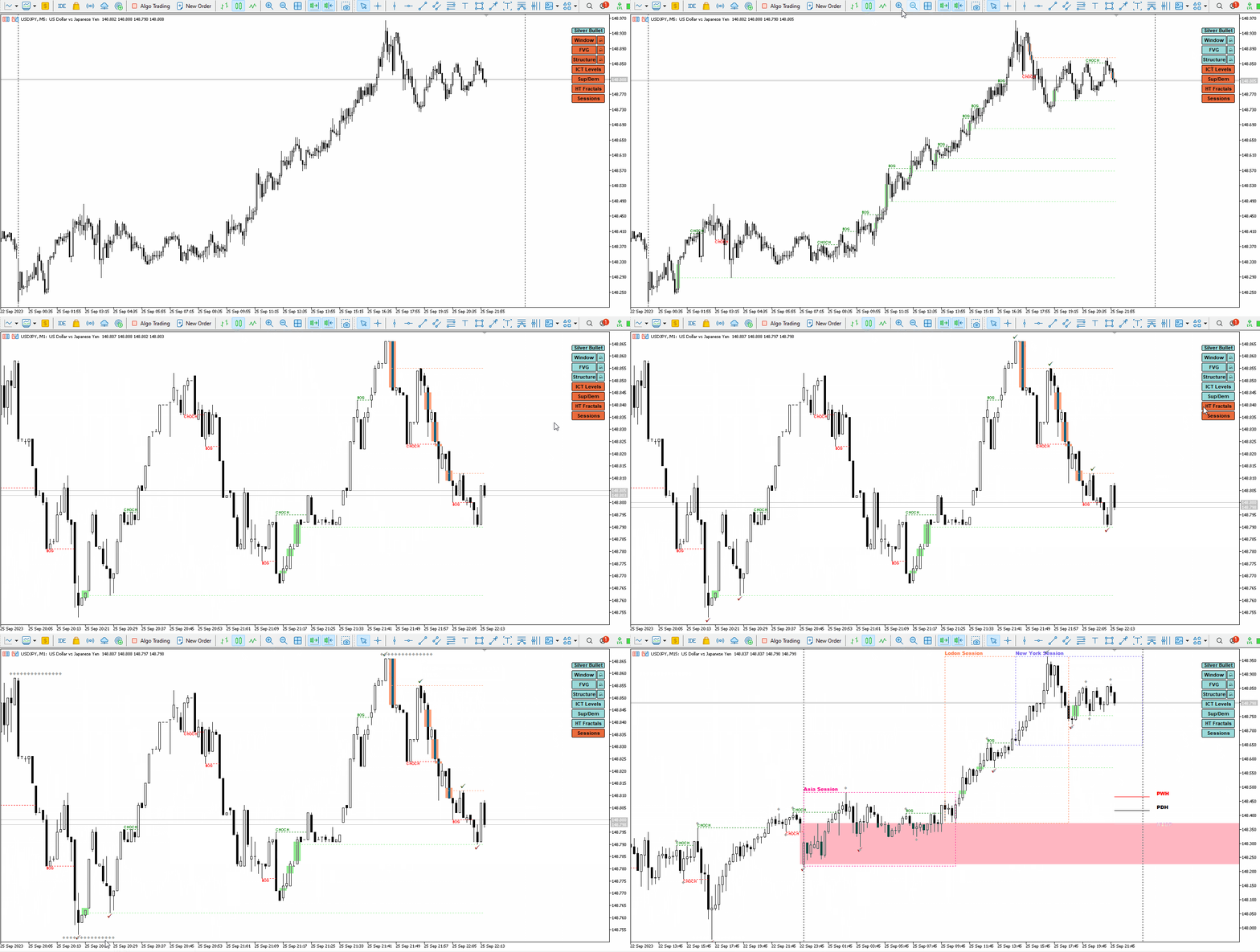
What the indicator plots:
| Element | Description |
|---|---|
| Windows | The three ICT Silver Bullet time windows |
| FVG | Bullish and bearish Fair Value Gaps (inside and outside windows) |
| Structure | BOS (Break of Structure) and CHoCH (Change of Character) |
| ICT Levels | Previous day high/low, previous week high/low, NWOG, NY Open price |
| Sup/Dem | Buy-side and sell-side liquidity zones from market structure |
| HT Fractals | Higher timeframe highs and lows overlaid on lower timeframes |
| Sessions | Asia, London, and New York session ranges |
🔧 Installation
Follow the standard MQL5 product installation guide.
📐 Strategy Summary
The Silver Bullet strategy was developed by Michael J. Huddleston (ICT). It is a time-boxed setup that repeats on forex and indices across three daily windows:
| Window | New York Local Time |
|---|---|
| Window 1 | 3:00 AM – 4:00 AM |
| Window 2 | 10:00 AM – 11:00 AM |
| Window 3 | 2:00 PM – 3:00 PM |
To take a valid entry:
- Identify a Fair Value Gap inside the window
- Confirm market structure supporting the direction (BOS or CHoCH)
- Verify a minimum trade framework — at least 10 points for indices or 15 pips for forex
A more robust setup adds confluence with a draw on liquidity: the current week's NWOG, the previous day's high/low, the previous week's high/low, or the previous session's high/low. Combining with the ICT Optimal Trade Entry (OTE) and the 2022 ICT Mentorship model increases the quality of setups.
⚙️ A. General Settings
| Parameter | Description |
|---|---|
| Indicator Comment | A label included in alerts sent by the indicator — useful to identify which chart triggered the alert. |
| Magic Number | Must be unique for each chart the indicator is loaded on. The indicator uses this to track which graphical objects belong to which chart instance. Using the same magic number across multiple charts will mix up your visuals. |
| Current Broker GMT Shift | Your broker's server time offset from GMT. Example: if your broker is at GMT+3, enter 3. |
| Current NY to GMT Shift | New York's offset from GMT. Use -4 during summer (daylight saving) or -5 during winter. |
| Number of Loopback Candles | How many historical candles the indicator scans to plot FVGs, structure, and other elements. Default is 200. |
Timezone configuration example: ICT Window 1 is 3:00–4:00 AM New York time. If your broker is at GMT+3 and New York is at GMT-4 (daylight saving), your broker's equivalent time is: 3 AM + 4h (to GMT) + 3h (broker offset) = 10:00–11:00 AM broker time. The indicator handles this automatically when you enter the correct GMT shifts.
🔔 B. Alerts Settings
| Parameter | Description |
|---|---|
| Notification via Alert | If true, a native MetaTrader alert window pops up when a new FVG is detected. |
| Notification via Push Message | If true, a push notification is sent to your mobile device (requires MT5 push notification setup). |
| Alerts Limited Inside Window | If true, alerts are only sent for FVGs forming inside a Silver Bullet window. When the Window button is turned off on the panel, all alerts are also turned off. |
🕐 C. Silver Bullet Window Settings
| Parameter | Description |
|---|---|
| Silver Bullet Time Window Color | The color used to shade the Silver Bullet windows on the chart. |
| Fill Window | If true, the window is filled with a color rectangle. If false, only the border is shown. |
| Window 1–3: Start/End Hour (0-23) | The start and end hours for each window in New York local time (default). |
| Window 1–3: Start/End Minute (0-59) | The start and end minutes for each window. |
Default windows (New York time):
- Window 1: 3:00–4:00 AM
- Window 2: 10:00–11:00 AM
- Window 3: 2:00–3:00 PM
📊 D. Fair Value Gap (FVG)
A Fair Value Gap is a price imbalance identified across three consecutive candles. For a bullish FVG at candle X: the gap is the space between the high of candle X-1 and the low of candle X+1. A bearish FVG is the opposite.
When price later revisits a FVG, the indicator shows a partial-fill line inside the rectangle — helping you identify the moment price re-enters the zone as a potential trigger point.
| Parameter | Description |
|---|---|
| Minimum FVG Height | Filters out insignificant FVGs below this size. Set based on the instrument — a 1–2 pip FVG on EURUSD may not be worth trading. |
| Bullish FVG Color | Color for bullish (buy-side) FVGs. |
| Bearish FVG Color | Color for bearish (sell-side) FVGs. |
| Option to Plot FVG | Choose between: All FVGs (all detected), Unfilled Only (hides FVGs that have been fully filled), or Partially Filled (keeps FVGs visible until fully filled, with a line showing how far price has penetrated). |
📏 E. ICT Level Settings
These are the draw on liquidity levels that ICT identifies as key price magnets.
| Parameter | Description |
|---|---|
| Ray Levels on Chart | If true, levels extend as rays across all charts. If false, they are drawn only up to the current candle's right edge. |
| Previous Day High/Low Color | Color for PDH and PDL levels. |
| Previous Week High/Low Color | Color for PWH and PWL levels. |
| Number of Past NWOGs | How many previous New Week Opening Gaps to display (up to 3). |
| Current NWOG Color | Color for the current week's NWOG. |
| New York Open Price | Plots the price at which the New York session opened. |
| Long or Short Label Format | Toggle between full labels (e.g. "Previous Daily High") and short labels (PDH, PDL, PWH, PWL, NWOG, NYOP). |
| Level Line Style | Solid, dashed, or dotted line style for level lines. |
📉 F. Structure Settings
| Parameter | Description |
|---|---|
| Zigzag Depth | Controls the sensitivity of swing high/low detection used for BOS and CHoCH. A higher value finds larger, more significant swings; a lower value is more sensitive to minor swings. |
| Bullish BOS/CHoCH Color | Color for bullish structure breaks. |
| Bearish BOS/CHoCH Color | Color for bearish structure breaks. |
| Structure Line Style | Line style for BOS and CHoCH labels. |
🏗️ G. Supply and Demand
Supply and Demand zones identify areas where buy-side (demand) and sell-side (supply) liquidity may accumulate, based on market structure and price range analysis on the current timeframe.
| Parameter | Description |
|---|---|
| Plot Style | Display zones as check marks (small markers at key levels) or lines (horizontal level lines). |
| Line Style | If line style is selected, choose between solid, dashed, or dotted. |
| Supply Color | Color for sell-side supply zones. |
| Demand Color | Color for buy-side demand zones. |
🔭 H. HT Fractals
Higher Timeframe Fractals overlay the highs and lows of a higher timeframe directly onto a lower timeframe chart — without needing to switch timeframes.
The fractals are represented as dots. The number of dots equals the ratio between the higher and lower timeframe. Example: on a 1-minute chart, a 15-minute fractal level appears as 15 dots (because 15 minutes = 15 × 1-minute candles).
| Parameter | Description |
|---|---|
| HT Fractal Timeframe 1 | First higher timeframe to compare (e.g. M15 when on M1). |
| HT Fractal Timeframe 1 Color | Color for the first timeframe fractal dots. |
| HT Fractal Timeframe 2 | Second higher timeframe (e.g. H1). |
| HT Fractal Timeframe 2 Color | Color for the second timeframe fractal dots. |
🌐 I. Sessions Settings
Plots the trading session ranges (Asia, London, New York) using the default New York local times. Useful for identifying session highs and lows as potential liquidity targets.
| Parameter | Description |
|---|---|
| Session Representation | Display sessions as High/Low lines only, empty rectangles, or filled rectangles. |
| Asia Session Color | Color for the Asian session range. |
| London Session Color | Color for the London session range. |
| New York Session Color | Color for the New York session range. |
| Manual Adjustment | Fine-tune the start/end times for each session if your broker's hours differ from the defaults. |
🖥️ J. Control Panel Settings
The on-chart control panel lets you toggle each indicator element (Windows, FVG, Levels, Structure, Sup/Dem, HT Fractals, Sessions, Alerts) on and off with a single click. It is compatible with 4K resolution screens.
| Parameter | Description |
|---|---|
| Position | Top Left, Top Right, Bottom Left, or Bottom Right. |
| Vertical Shift | Distance from the chart's vertical border. |
| Horizontal Shift | Distance from the chart's horizontal border. |
📋 Disclaimer
The products and software provided by Trade't are tested in certain market conditions and technical environments. Trade't is not responsible for any loss, error, or misuse of the provided software. Users are invited to do their own testing in a demo environment before using any tools in a live setting with real money — this decision is their sole responsibility and at their own risk.
Past performance is no indication or guarantee of future performance. Trading forex involves a significant risk of loss. Always do your due diligence before making any investment decision.
ICT Silver Bullet Indicator
Store pricing available
Add this product to your Trade't basket and complete payment securely through Mitalio.