DrawDown Limiter v5.0 — User Guide
Last updated: 2026-08-25
Applies to: DrawDown Limiter v5.0 for MetaTrader 5 and MetaTrader 4
Guide and prop-firm rules reviewed: 25 August 2026
Purpose: website-ready product documentation and operating guide
DrawDown Limiter is a client-side safety controller. It can isolate local strategy charts, delete pending orders, and close positions after detecting a limit. It cannot make a broker reject a trade before acceptance, and it cannot control trades sent from a mobile app, web terminal, API, service, or another terminal until those trades become visible to this terminal. Guaranteed prevention requires a broker-side restriction.
1. What the EA does
DrawDown Limiter continuously evaluates the account against configured risk, profit, news, schedule, rollover, and position-count rules. When a full protection condition becomes active, it uses one unified response:
- Publish the shared entry-block flag.
- Isolate strategy charts if the selected chart action requires it.
- Delete protected pending orders.
- Preserve or close protected positions according to the selected trade action.
- Keep enforcing the response until every active protection cause has legitimately cleared.
- Restore saved charts when automatic restoration is selected and release is safe.
The order matters. Strategy charts are closed before positions so a local EA cannot immediately recreate a position that the limiter has just closed.
The following conditions use the full response:
- Maximum daily drawdown.
- Maximum account drawdown.
- Maximum account profit.
- Daily profit target when its action is Activate Protection Until Reset.
- Breakeven protection after it has armed and then triggered.
- Rollover security breach.
- Scheduled protection.
- News, holiday, all-day news, or unreliable news-data block.
- Persistence or range-transition failure, which fails closed.
Maximum open positions and maximum positions opened in the range are deliberate exceptions. They keep charts open and apply excess-only control; see Overtrading protection.
2. What the EA cannot guarantee or reconstruct
Client-side protection limits
DrawDown Limiter runs inside one MetaTrader terminal. It observes account and terminal state, decides whether a rule has triggered, and then submits close/delete requests. This has important consequences:
- It cannot make the broker reject a manual, mobile, web, API, signal, service, or another-terminal trade before the broker accepts it.
- It cannot act while this terminal is offline, disconnected, frozen, closed, or denied trading permission.
- Closing or quarantining charts controls EAs attached to this local terminal only. It does not stop an EA, copier, API, or service running elsewhere.
- The shared entry-block Global Variable prevents an order only when the submitting EA was deliberately coded to honor that contract. Unknown EAs can ignore it.
- It cannot force a user or third-party EA to size an entry correctly, attach a stop loss, or avoid a symbol. The new-trade risk checks are alerts, not broker-side entry rules.
- It cannot guarantee the final close price, execution time, commission, spread, slippage, or that the account will remain inside a prop-firm limit during a fast move.
- It does not lock MetaTrader inputs, account credentials, or the prop firm's dashboard against manual changes.
In short, the limiter reacts after the terminal can observe an event. Use a safety buffer and broker/server-side controls whenever guaranteed rejection is required.
Chart restoration limits
The chart vault uses MetaTrader templates. A template can restore the symbol, timeframe, chart appearance, indicators, chart objects, attached EA, and saved EA inputs. It does not reconstruct:
- An EA's volatile runtime memory.
- Exact chart IDs.
- Exact tab, dock, detached-window, or screen position.
- Scripts or chartless services.
- A missing or renamed EA binary.
- DLL permission beyond what both MetaTrader and the saved template allow.
Restored EAs start again through OnInit. Template files can contain sensitive EA inputs. The vault uses bounded, hashed local names and reuses its slots, but MQL cannot automatically delete template files from MetaTrader's Templates directory.
3. Recommended first-time setup
- Confirm the prop firm's rules in its current dashboard and terms. Firms can change rules without changing an existing account.
- Open one dedicated chart for DrawDown Limiter. Do not attach a trading strategy to that chart.
- Enable algorithmic trading and allow live trading for the limiter. The limiter needs trade permission to delete orders and close positions.
- Load the required
.setfile or configure the inputs manually. - Confirm that Account initial size, reset clock, daily reference, drawdown limits, and trade scope match the account.
- Keep the safe default actions: Close Protected Trades and Close + Restore Charts, unless the strategy requires preserved positions.
- If Forex Factory or Investing.com is selected, add the provider URL to MetaTrader's WebRequest allow-list before enabling news protection.
- Check the panel: the account number, account type, monitoring scope, next reset, and loss cushions must all be sensible.
- Test the complete workflow on a demo account, including chart capture, protection, restoration, terminal restart, and Start Fresh.
Loading a preset
Open the EA's Inputs tab, select Load, browse to the supplied .set file, and then review every value before selecting OK. The supplied files intentionally do not contain license or email credentials.
When changing a live configuration, remember that limiter state and a pending chart vault survive reattachment and terminal restart. If the intention is genuinely to discard the old limiter history, first make the account flat and use Start Fresh from the Chart Vault card.
4. Core concepts
Account drawdown
Account drawdown is a static account-wide equity floor:
Account floor = Account initial size × (1 − Maximum account drawdown %)
For a 100,000 account with a 10% limit, the floor is 90,000. The limiter evaluates current equity, including floating P/L and trading costs reflected by MetaTrader.
The recommended prop presets use a 9.5% safety trigger, producing a 90,500 limiter floor. The published firm floor can still be 90,000. The extra 500 is execution headroom for latency, slippage, commissions, swaps, and a fast market.
Maximum account profit
Maximum account profit is an account-wide stop level:
Profit stop equity = Account initial size × (1 + Maximum account profit %)
At the level, the full configured protection response begins. This lock is intentionally persistent; it is designed to stop further trading after the objective has been reached. Set the input to 0 to disable it for a phase with no account profit objective, then initialize the correct state safely.
The prop presets use a 0.1% target buffer. For example, an FTMO 10% target uses a 10.1% limiter stop. The firm generally evaluates closed balance with positions flat, while the limiter must begin closing from live equity. The small excess helps absorb closing costs. It is not a guarantee in a highly volatile market.
Daily range
A range is the EA's protection day. Its start determines when daily counters, daily target latches, breakeven state, scheduled-protection state, and range-position counters reset.
Use the firm's actual risk-day clock—not local PC time unless the firm explicitly uses it.
Daily drawdown tracking methods
| Method | Calculation | Best use | Important consequence |
|---|---|---|---|
| Open And Closed Positions | Loss is the negative part of closed P/L since reset plus current floating P/L. | Firms that define daily loss as today's closed result plus open floating result. | Profit earned today expands the amount that can subsequently be lost before the fixed daily loss amount is reached. Positions carried across reset immediately contribute their current floating P/L. |
| Start-Of-Range Equity | Loss is range-start equity − current equity, never below zero. | A daily floor anchored to equity captured at the reset. | Profit from before the reset is embedded in the starting equity. Intraday profit can be given back before a loss is counted from the start value. |
| High-Water Equity | Loss is highest equity observed in the range − current equity. | A trailing intraday equity stop. | Every new equity high raises the floor. It is stricter than most prop-firm daily rules and does not reset its high-water value until the next legitimate range. |
Example with a 100,000 start and a 5,000 risk amount:
- The account gains 2,000 and then falls to 96,000.
- Open And Closed Positions sees the range result as −4,000, so 1,000 remains.
- Start-Of-Range Equity also sees a 4,000 drop from 100,000, so 1,000 remains.
- High-Water Equity saw 102,000 and now sees a 6,000 decline, so protection has already triggered.
The methods differ more clearly when exposure is carried through the reset. Always select the method that reproduces the firm's formula, not the one that merely displays the largest cushion.
Daily drawdown reference modes
The reference mode selects the base used to calculate the daily money limit:
| Input value | Reference used at range start | Meaning of DD Percent or Risk Amount |
|---|---|---|
| From Initial Deposit | Configured Initial Deposit | Percentage of that fixed amount. |
| From Account Balance | Balance captured at reset | Percentage of range-start balance. |
| From Account Equity | Equity captured at reset | Percentage of range-start equity. |
| Fixed Risk In Account Currency | Configured initial value is retained as context | The input is a money amount, not a percentage. Example: 4500 means 4,500 account-currency units. |
| Higher Of Equity Or Balance | Higher of the two values captured at reset | Percentage of that higher value. |
The reference selects the permitted loss amount; the tracking method determines how current loss is measured. They are independent settings and must be chosen as a pair.
5. Full input reference
General Settings
| Input | Meaning and guidance |
|---|---|
| DrawDown Limiter instance magic | Positive identifier for this limiter instance and its state ownership. Use a different value for genuinely independent limiter configurations. Do not casually change it to bypass a saved lock. |
| Trade comment and display name | Name used in logs, alerts, and parts of the panel. Length: 1–31 characters. |
| Shared entry-block contract and owner scope | Name of the account-wide terminal Global Variable used as the entry gate. Other cooperating EAs can check it before submitting an order. Unknown EAs may ignore it, which is why chart isolation and continuous close enforcement exist. |
| Monitoring | false evaluates market rules on the configured interval. true evaluates market rules on every tick while a one-second clock service still handles reset, news, schedules, leases, vault retries, and UI time. |
| Monitoring interval in ms | Used only in interval mode. Valid range: 10–60,000 ms. A shorter interval reacts faster but consumes more terminal resources. The prop presets use 250 ms. |
Reset Cycle
| Input | Meaning and guidance |
|---|---|
| Daily protection reset clock | Daily Bar Open follows the current chart symbol's broker D1 bar. Broker Server Time uses the selected hour/minute in server time. Configured Time Zone uses a fixed standard UTC offset plus an optional supported DST rule. |
| Reset hour / minute | Range start in the selected clock. Ignored by Daily Bar Open where the bar time itself is authoritative. |
| Standard UTC offset in minutes | Time-zone mode only. Enter the standard, non-DST offset: 60 for UTC+1, 180 for UTC+3, -300 for UTC−5. |
| Daylight-saving rule | Time-zone mode only: none, Europe, or United States. The EA adds the seasonal hour according to the selected rule. |
| Extend ranges over weekends | With applicable non-time-zone modes, prevents an artificial weekend reset. Configured Time Zone uses calendar days and requires this setting to be off. |
Daily Bar Open is convenient when the firm's day exactly matches the broker's D1 candle. Use Broker Server Time when the firm explicitly defines midnight server time. Use Configured Time Zone when the firm's clock is independent of the broker, such as FTMO's CE(S)T day.
Account Drawdown
| Input | Meaning and guidance |
|---|---|
| Account initial size | Original challenge/account size used for static account loss and profit levels. It is not automatically replaced by current balance. |
| Maximum account drawdown percent | Static account-wide equity-loss trigger. Must be greater than 0 and below 100. |
| Maximum account profit percent | Account-wide profit stop. 0 disables it. Because it is account-wide, it requires All Trades scope. |
Daily Drawdown
| Input | Meaning and guidance |
|---|---|
| Trades controlled by this instance | All Trades, One EA Magic, or Multiple EA Magics. Full chart isolation and maximum-account-profit protection require All Trades. Magic-scoped MT5 protection requires a hedging account because a netting position can mix ownership. |
| One/list of EA magic numbers | One magic or a delimited list used by the selected scoped mode. Ignored for All Trades. |
| Drawdown reference mode | Selects the range reference described above. |
| Initial Deposit | Fixed reference for From Initial Deposit and context for fixed-risk mode. Set it to the original account size. |
| DD Percent or Risk Amount | Percentage for every reference except Fixed Risk In Account Currency, where it is the exact money amount. |
| Daily drawdown tracking method | Open+closed, start-of-range equity, or high-water equity. |
| Include swap and commission | Includes recorded swap and commission in scoped P/L calculations. Keep it enabled for prop rules that count costs. |
Rollover Security Zone
| Input | Meaning and guidance |
|---|---|
| Enforce floating loss near range end | Enables an additional floating-loss cap during the final minutes before the next reset. |
| Security-zone length in minutes | How long before reset the rollover zone starts. |
| Percent of daily risk | Maximum floating loss allowed in the zone as a percentage of the daily risk amount. 0 disables the cap. Example: daily risk 4,500 and setting 50 means a 2,250 floating-loss allowance during the zone. |
This feature is useful when a profitable closed day is masking a large floating loss that would become an immediate breach after midnight.
Overtrading Protection
| Input | Meaning and guidance |
|---|---|
| Maximum positions opened in range | Total positions opened during the current range. 0 means unlimited. Once reached, new/excess matching exposure is removed and the restriction remains until reset. |
| Maximum simultaneously open positions | Maximum open positions at one time. 0 means unlimited. At the limit, additional entries and risky pending orders are blocked; above it, only excess positions are removed. The restriction releases when count falls below the limit. |
These two controls do not close or vault charts. The Positions card explicitly says EXCESS-ONLY CONTROL — CHARTS REMAIN OPEN so the user can manage allowed positions.
New Trade Risk Alerts
| Input | Meaning and guidance |
|---|---|
| Alert when a trade has no stop loss | Advisory notification for new positions without a visible stop. It does not automatically add a stop. |
| Risk alert mode | No check, percent of balance, percent of equity, or fixed account currency. |
| Maximum accepted risk | Advisory threshold interpreted by the selected risk mode. The estimate depends on the visible stop and symbol properties. |
These are alerts, not hard trade-entry rules. Manual Pause suppresses untriggered advisory checks.
Actions
Trade action during protection
| Value | Actual behavior |
|---|---|
| Keep Pre-Existing Exposure / panel KEEP EXPOSURE | Captures the ticket and volume baseline when protection starts, deletes pending orders, preserves only baseline exposure, and repeatedly closes any new ticket or added netting volume. If an added netting portion cannot be separated safely, the affected position is closed fail-closed. |
| Close Protected Trades / panel CLOSE TRADES | Repeatedly closes every position and deletes every pending order in the configured scope, including exposure recreated during the block. This is the default. |
Keeping exposure is not the same as doing nothing: pending orders are deleted and new exposure is still removed.
Chart action during protection
| Value | Actual behavior |
|---|---|
| Keep Charts Open / panel KEEP OPEN | Leaves strategy charts available for managing preserved exposure. |
| Close Charts — Manual Reopen / panel MANUAL CLOSE | Saves the eligible charts, closes them, and quarantines new charts during protection. They are not reopened automatically. After protection is clean, the one-use Restore Charts button reopens the saved set. |
| Close + Restore Charts / panel CLOSE + RESTORE | Saves and closes eligible charts, quarantines new ones, and automatically restores the saved set after every full protection cause clears and two clean evaluations occur at least one second apart. This is the default. |
Safe-combination rules are enforced:
- Keep Pre-Existing Exposure requires Keep Charts Open.
- Either chart-closing mode requires Close Protected Trades.
- Chart-closing modes require All Trades scope.
- Retired numeric chart-action values
2and3migrate to Close + Restore Charts.
Alerts and FIFO
| Input | Meaning and guidance |
|---|---|
| External alert channels | Panel/log only, push, email, or push+email. MetaTrader must already be configured for the selected external channel. |
| NFA/FIFO handling | No FIFO, same-size FIFO, or FIFO including partial closes. Select only when the account requires it. FIFO constraints can delay or limit the way positions are closed. |
Scheduled Protection
| Input | Meaning and guidance |
|---|---|
| Protection schedule | Off, every day, or one selected weekday. |
| Scheduled hour / minute | Trigger time in broker server time. Once triggered, the common protection response remains active until the next range reset. |
The panel's AUTO CLOSE TRADE control is a temporary session toggle. It displays the configured day and server time when enabled. Manual Pause can suppress a schedule that has not triggered, but cannot suspend an active protection transaction.
Daily Profit Target and Breakeven
| Input | Meaning and guidance |
|---|---|
| Daily target mode | Disabled, percentage of the daily reference, or fixed amount in account currency. This is a daily target, separate from Maximum Account Profit. |
| Daily target | Percentage or money amount according to the selected mode. |
| Action when target is reached | Notify Only records and alerts without a hard lock. Activate Protection Until Reset applies the common trade/chart response until the next range. |
| Breakeven protection | When enabled, arms after the configured positive range P/L and triggers if range P/L later returns to zero. Arming alone does not close anything. |
| Breakeven arm percent | Positive daily-reference percentage required to arm the lock. |
News Protection
| Input | Meaning and guidance |
|---|---|
| Block new entries around qualifying news | Master switch. Disabled by default. When enabled, news is a full transient protection cause using the common trade/chart actions. |
| News source | MT5: MQL5 Calendar, Investing.com, or Forex Factory. MT4: Investing.com or Forex Factory. MQL5 Calendar is the MT5 default. |
| Currencies | Exact comma-separated currency codes. Empty means all currencies. The block is account-wide; choose only currencies relevant to the account's traded instruments. |
| Include event keywords | Optional keyword allow-list. Empty means all matching events. |
| Exclude event keywords | Optional keyword deny-list applied after inclusion. |
| Impact levels | Low, moderate, and/or high. If regular event blocking is enabled, at least one impact must be selected. |
| Avoid holidays | Blocks the broker-server calendar day for a qualifying holiday. |
| All-day no trade | Blocks the complete qualifying event day rather than only a timed window. |
| Use timed news window | Enables before/after event windows. |
| Minutes before / after | Start and end buffer. Valid range: 0–10,080 minutes. |
News data is loaded on attachment and refreshed at each legitimate range start. Empty, stale, failed, or unsupported data fails closed: the same configured trade/chart response is applied until reliable data says entries are allowed. News alone does not set the persisted drawdown latch, and it releases only its own owner when the window ends. Another active cause continues to hold protection and delay restoration.
For Forex Factory, allow this URL in Tools → Options → Expert Advisors → Allow WebRequest for listed URL:
https://nfs.faireconomy.media/ff_calendar_thisweek.csv
HTTP 429 means the remote service rate-limited the terminal; it is not a missing allow-list permission. The provider retries using its cache/backoff policy, while the limiter remains fail-closed.
6. Unified protection states and release behavior
| Cause | Full trade/chart response? | Release condition |
|---|---|---|
| Daily drawdown | Yes | New legitimate range and clean evaluation. |
| Account drawdown | Yes | Range lifecycle plus account metrics back inside the configured limit; otherwise it retriggers. |
| Maximum account profit | Yes | Intentional persistent stop; disable with input 0 and reinitialize safely. |
| Daily profit target | Only with Activate Protection Until Reset | Next range. |
| Breakeven | Only after it triggers | Next range. |
| Rollover breach | Yes | Next range. |
| Scheduled protection | Yes | Next range. |
| Persistence/reset failure | Yes, fail-closed | Valid recovery and committed range state. |
| News/holiday/data failure | Yes | Reliable evaluation confirms the block ended. |
| Maximum open positions | No; excess-only | Count below the limit. |
| Maximum range positions | No; excess-only | Next range. |
| CLOSE ALL button | Direct operator close | One-time operation; it does not create a chart-action lock. |
Overlapping full causes share one response. Charts are restored only after every cause has cleared. One owner cannot clear another owner's protection.
7. Chart Vault operation
Capture and quarantine
For a chart-closing action, the vault:
- Acquires account-wide ownership.
- Enumerates charts safely.
- Excludes registered DrawDown Limiter and guardian/controller charts.
- Records symbol, timeframe, opening order, template slot, and the MT5 EA name where available.
- Saves and verifies each chart template with bounded retries.
- Closes every eligible chart even if its template could not be saved; failed charts are marked non-restorable and reported.
- Verifies closure and enters quarantine.
- Closes newly opened non-protection charts while the block remains active. New quarantine charts are not added to the saved manifest.
Automatic restore
For Close + Restore Charts, the limiter waits until the range transition is committed, news is reliable and clear, persistence is valid, no full cause remains, and no other hard/vault owner exists. It then requires two clean evaluations at least one second apart.
Charts are reopened in recorded order. The vault opens the symbol/timeframe, applies the saved template, and on MT5 verifies the expected EA name when available. Open/apply retries use bounded backoff. At the end it reports RESTORED n/N — x FAILED. Best-effort release does not clear another protection owner.
Manual restore
For Close Charts — Manual Reopen, a blue RESTORE CHARTS call-to-action appears after the protection is clean and a saved set is available. It requires a flat account, publishes the entry gate during recovery, waits for two clean checks, restores the set once, then consumes the restore entitlement. The button becomes grey so it cannot create unlimited duplicate charts.
Start Fresh
Use START FRESH only when the intention is to discard this account/magic's limiter history and build a new range from the currently loaded inputs.
Safety sequence:
- The account must have no positions or pending orders.
- Click START FRESH once.
- Click again within the displayed 10-second window.
- Confirm the MetaTrader message box.
- The limiter restores any pending saved charts first.
- It clears only its scoped persistence, commits a new range, and then releases its gate if no current rule blocks trading.
If restoration, persistence deletion, or new-range commit fails, Start Fresh aborts and retains protection. It cannot reconstruct charts that were closed without a saved vault, and it does not delete template slots.
8. Overtrading protection
At the maximum
- Additional entries are blocked for All Trades scope.
- Pending orders that could exceed the limit are deleted.
- Existing allowed positions remain open.
- Strategy charts remain open.
Above the maximum
- Only positions beyond the captured cutoff are closed.
- Positions within the permitted allowance are preserved.
- The limiter repeatedly removes matching excess exposure if another EA recreates it.
- FIFO-safe ordering is used when configured.
For magic-scoped operation, only matching exposure is controlled and the account-wide shared entry flag is not published. On MT5, magic-scoped control requires a hedging account.
9. Panel guide
The dashboard automatically changes layout with the chart size:
- Wide: at least 1100 × 700 pixels.
- Standard: at least 900 × 680 pixels.
- Dense: at least 760 × 520 pixels.
- Safety/minimal: smaller charts show only the most important protection strip and controls.
Resizing does not change protection logic.
Header
| Label | Meaning |
|---|---|
| **DRAWDOWN LIMITER | v5.0** |
| PROTECTION SAFE | No active block and data is reliable. |
| PROTECTION ARMED | A temporary protection, vault operation, or other active enforcement is armed/active without a persisted hard trigger. |
| PROTECTION PAUSED | Manual Pause is active. Hard-risk monitoring and already active protection still take priority. |
| PROTECTION DATA ERROR | News protection is enabled but its data cannot be trusted; fail-closed response is active. |
| PROTECTION TRIGGERED | A hard protection cause or triggered limiter lock is active. |
| **Account number | REAL/DEMO/CONTEST** |
| Monitoring: ALL TRADES / magic scope | Shows the selected trade scope. |
| ACCOUNT | Current account return from configured Account initial size, followed by SAFE/limit state. |
| LOSS CUSHION | The smaller remaining cushion between account and daily drawdown limits. |
| DD USED | Current daily drawdown usage against its configured limit. |
| PROFIT PROGRESS | Progress toward the active daily or account profit target. OFF means neither is active. |
| NEXT PROTECTION | Active news/rollover state or countdown to the nearest configured window. Durations longer than a day use Nd HH:MM:SS. |
| DAILY RESET | Countdown to the next legitimate range start. |
| Server clock | Current broker server time. |
| TEMP OVERRIDE | Appears when one or more panel choices differ from loaded EA inputs. The detailed warning remains in Protection Controls. |
| _ / + | Minimize to the compact strip or restore the full dashboard. |
| H | Hide the dashboard while protection continues. Use the remaining restore tab/control to show it again. |
The minimized strip can show a compact item such as TEMP 1; this means one temporary panel override is active, not one template or one trade.
Account Performance
- Percentage and WITHIN LIMITS: current equity return versus account initial size.
- Loss cushion: equity remaining above the account drawdown floor.
- Profit target remaining: equity remaining to the Maximum Account Profit level; shows disabled/locked when applicable.
- Equity / Reference: live equity and configured account initial size.
- Progress bar: a centered two-direction account bar. Loss fills red toward the left; profit fills blue toward the right. The unused portion remains dark.
Daily Drawdown
- Amount remaining: daily risk left before the limiter's trigger.
- Used / limit (%): current daily loss and money limit.
- Resets in: countdown to the next range.
- Tracking: selected tracking formula and configured limit.
- Context line:
- Range P/L since reset for Open+Closed.
- Start-of-range equity for Start-Of-Range Equity.
- High-water equity for High-Water Equity.
- The progress bar shows how much of the daily risk is consumed.
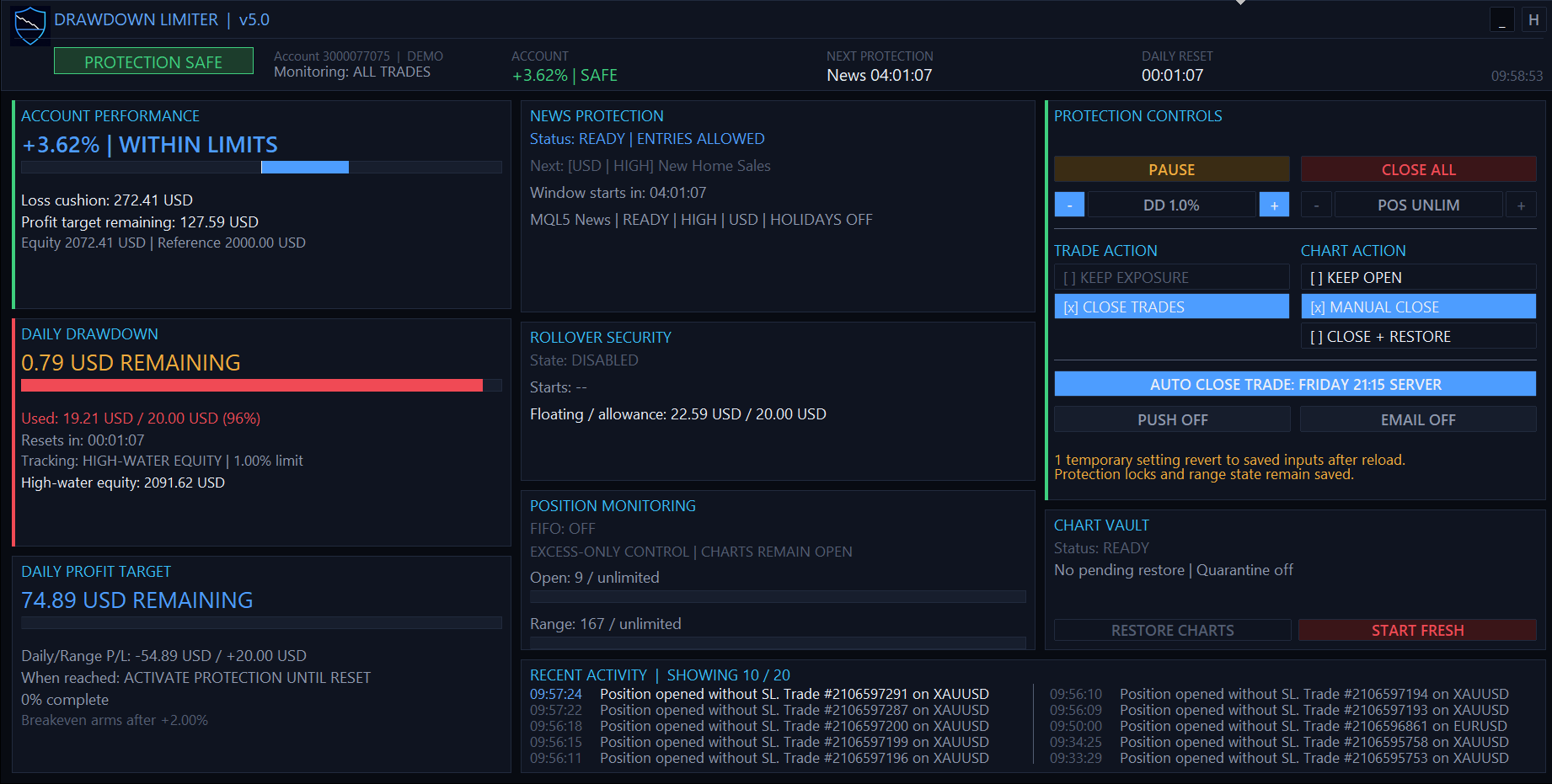
Protection remains safe while the Daily Drawdown card shows 96% usage and one temporary panel override.
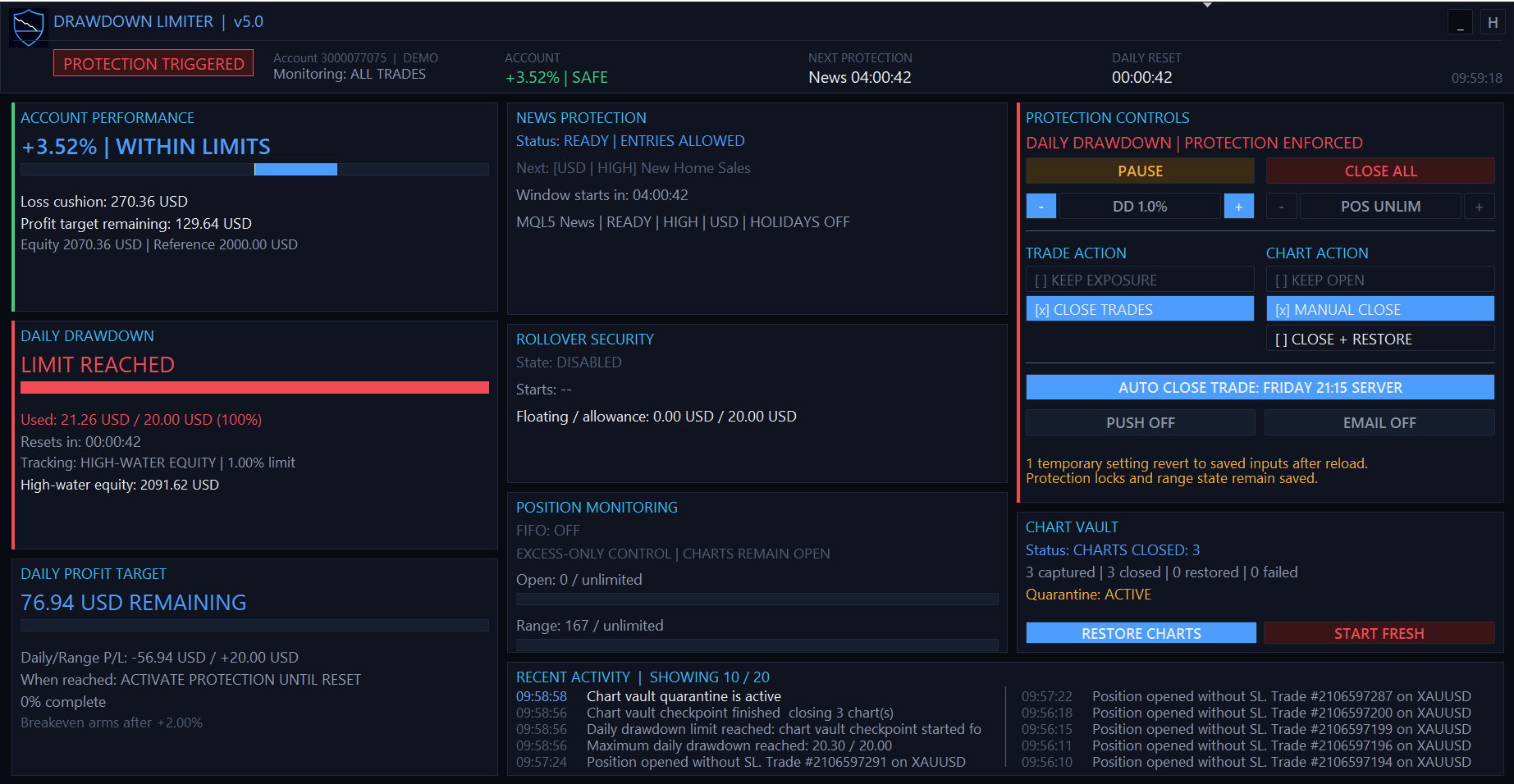
The daily drawdown limit is reached, full protection is enforced, and the saved charts remain quarantined until restoration is safe.
Daily Profit Target
- OFF: no daily target.
- ACTIVE / amount remaining: target is enabled and not reached.
- TARGET REACHED: threshold has been reached.
- Daily/Range P/L / target: current qualifying result and required result.
- When reached: Notify Only or Activate Protection Until Reset.
- Breakeven: off, arming threshold, armed, or triggered.
- The blue progress bar fills toward the configured daily target.
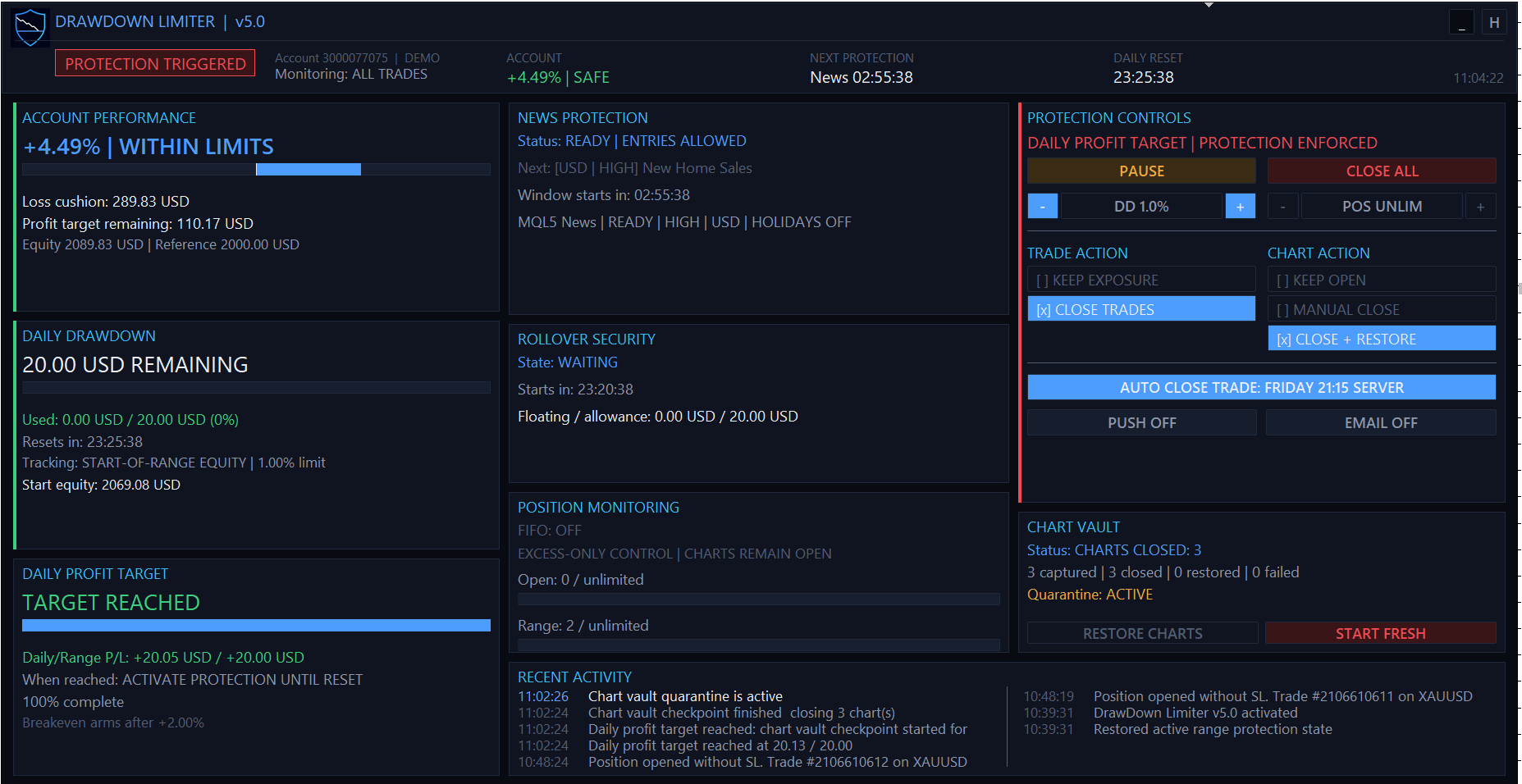
The daily profit target is reached, protection is enforced until reset, and the Chart Vault records the isolated charts.
News Protection
- Status READY / ERROR / BLOCKED: provider and decision state.
- ENTRIES ALLOWED / BLOCKED: current account-wide news gate result.
- Current: event currently producing a block.
- Current window: start/end of the active window.
- Next: next qualifying currency, impact, and event.
- Window starts in: countdown using days when necessary.
- Source: provider name and readiness.
- Last range load: most recent forced range-start refresh.
- Filters: selected impacts, currencies, and holiday setting.
- Response: effective trade and chart actions. News has no separate position-action setting.
- A red line in this card is an error or fail-closed reason. A literal red
Labelwould be a UI defect, not an intended state.
Rollover Security
- DISABLED: rollover control is off.
- WAITING: enabled, but the final security window has not started.
- ACTIVE: inside the final window and enforcing the floating allowance.
- BREACHED: floating loss reached the configured allowance and full protection triggered.
- Starts in / window: time until activation and configured zone length.
- Floating / allowance: current floating loss versus allowed money amount.
Position Monitoring
- FIFO: current FIFO mode.
- EXCESS-ONLY CONTROL — CHARTS REMAIN OPEN: confirms position limits are an exception to full chart isolation.
- Open x / limit: simultaneous open count and progress.
- Range x / limit: number opened in the current range and progress.
unlimitedmeans the corresponding input is0.
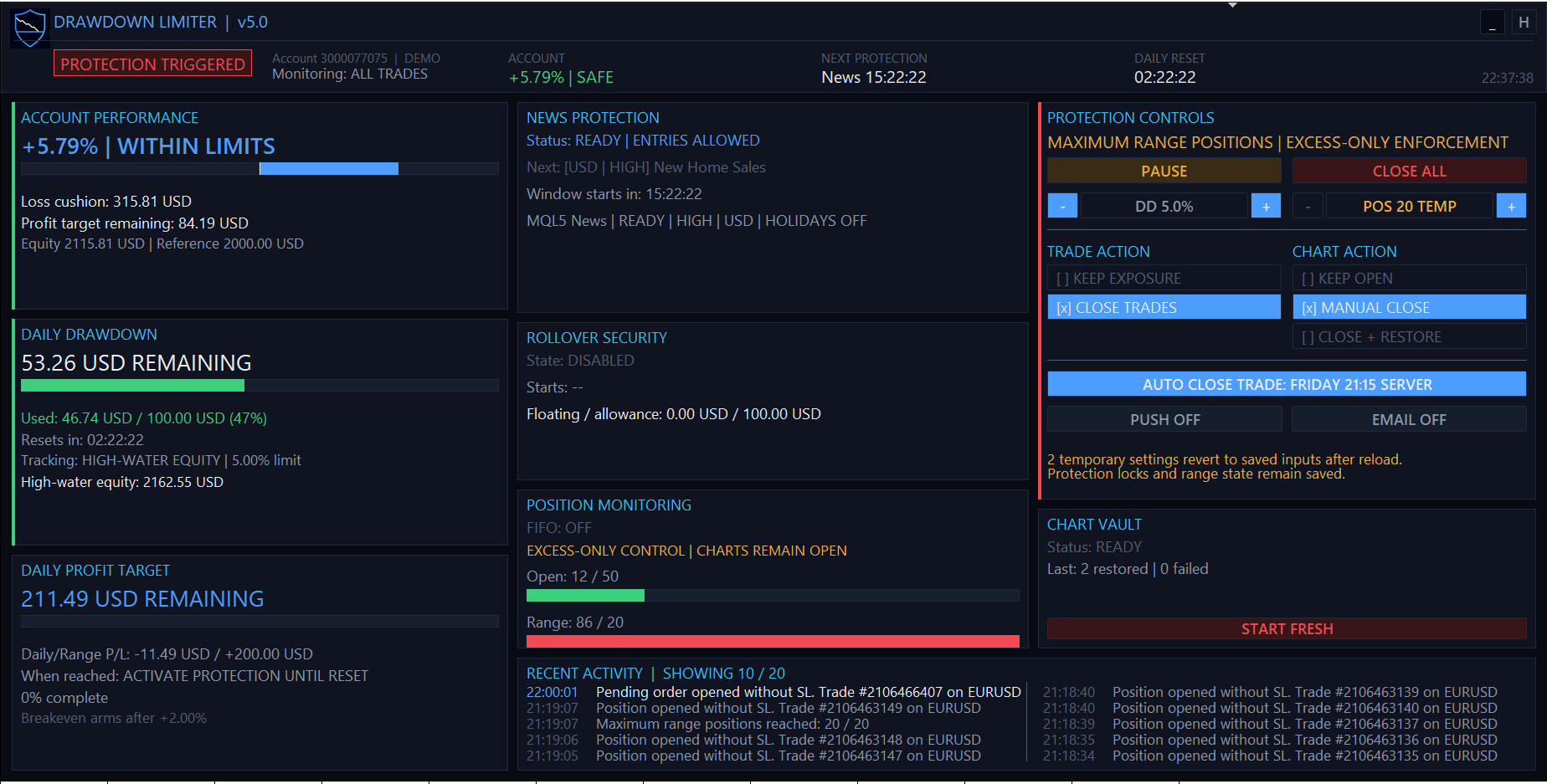
Maximum range positions has triggered excess-only enforcement: allowed exposure remains manageable and strategy charts stay open.
Protection Controls
- Scheduled Protection / protection state: current cause and enforcement summary.
- PAUSE: temporary manual pause for an untriggered schedule and advisory risk alerts. It does not cancel hard limits or an active response.
- CLOSE ALL: emergency one-time close of managed exposure. In All Trades scope it closes all account exposure; scoped configurations act only on their managed scope. Follow the displayed confirmation sequence.
- DD − / +: temporary daily percentage adjustment in 0.5-point steps. It is available only for percentage modes and is bounded around the loaded input.
- POS − / +: temporary maximum-range-position adjustment.
- TRADE ACTION: one selected common position response.
- CHART ACTION: one selected common chart response. Unsafe combinations are rejected.
- PUSH / EMAIL: temporary session toggles with filled blue backgrounds when enabled and dark/grey backgrounds when off.
- AUTO CLOSE TRADE: temporary schedule toggle. Blue means enabled and includes the configured weekday/time in server time; grey means off.
- Temporary settings revert...: panel overrides are session changes. Reloading the EA returns them to the Inputs values. Protection locks and committed range/vault state remain saved.
Changing an action while protection is already active may escalate protection after confirmation. An active response cannot be downgraded, and a pending vault restore is not discarded.
Chart Vault
- Status: READY, SAVING, CLOSING, CHARTS CLOSED, RESTORING, RESTORED, or ERROR according to the transaction phase.
- Captured / closed / restored / failed: cumulative chart counts for the current generation.
- Quarantine ACTIVE/OFF: whether newly opened strategy charts are being closed during protection.
- RESTORE CHARTS: one-use manual restore call-to-action when a manual-reopen snapshot is eligible.
- START FRESH: guarded recovery/reset operation described above.
- Last error: appears when a capture, close, apply, verify, or manifest operation fails.
Recent Activity
The card displays ten entries in two columns: the latest five are on the left and the preceding five on the right. The EA retains a newest-first 20-entry activity history internally. It records triggers, action changes, chart capture/close/restore, excess closes, data failures, releases, and recovery events.
10. Color system
Colors carry the same meaning across the dashboard:
| Color | Meaning | Typical examples |
|---|---|---|
| Green | Safe, available, positive, or low usage. | PROTECTION SAFE, entries allowed, positive P/L, usage below 75%. |
| Blue | Armed/selected/active configuration or profit progress. | PROTECTION ARMED, selected action, enabled notification button, account profit bar. |
| Amber/orange | Attention, temporary deviation, or approaching a limit. | Manual Pause, temporary override warning, 75% to under 90% usage, quarantine attention. |
| Red | Trigger, error, breach, destructive action, or very high usage. | PROTECTION TRIGGERED, data error, CLOSE ALL, START FRESH, 90%+ usage. |
| Cyan | Identity and section headings, not risk severity. | Card titles and product branding. |
| White | Primary values and high-priority readable text. | Equity, remaining money, selected values. |
| Grey | Secondary context, inactive, disabled, or unavailable. | Disabled feature, unselected action, explanatory lines. |
| Dark track/background | Unused progress and card structure. | Remaining part of a progress bar. |
The thin colored line at a card edge is a state accent. Green means that card is currently healthy; blue means armed/active; amber means attention; red means triggered or failed. It is not a separate limit.
Usage bars change from green below 75%, to amber from 75% through under 90%, and red at 90% or on breach. Daily Profit Target uses blue for completion progress. Account Performance uses blue on the profit side and red on the loss side.
11. Four common ways to use the EA
Case A — Maximum local isolation for an account running several EAs
Use when multiple local strategies may recreate trades after a loss limit.
- Scope: All Trades.
- Trade action: Close Protected Trades.
- Chart action: Close + Restore Charts.
- Monitoring: 250–1,000 ms interval.
- Daily tracking: match the firm's formula.
- Result: the limiter publishes the gate, saves and closes strategy charts, deletes pending orders, closes positions, quarantines new charts, and restores only after all causes clear.
This is the supplied prop-profile behavior and the strongest local response.
Case B — Preserve existing positions during a temporary block
Use when an open strategy must continue managing positions and the risk policy allows them to remain.
- Scope: All Trades or a valid hedging-account magic scope.
- Trade action: Keep Pre-Existing Exposure.
- Chart action: Keep Charts Open.
- Result: existing ticket/volume is preserved, pending orders are deleted, and any new or increased exposure is repeatedly removed.
Do not describe this mode as “Do nothing.” It actively prevents exposure growth.
Case C — Daily discipline target with breakeven protection
Example for a 100,000 personal account:
- Daily target mode: Percentage of Daily Reference.
- Daily target: 1.0%.
- Target action: Activate Protection Until Reset.
- Breakeven protection: enabled.
- Breakeven arm: 0.5%.
- Trade/chart action: Close Protected Trades + Close + Restore Charts.
If range P/L reaches 500, breakeven arms. If it later returns to zero, protection triggers. If daily P/L reaches 1,000 first, target protection triggers until reset. The account profit stop remains a separate multi-day objective.
Case D — Overtrading guard without removing management charts
- Maximum open positions: for example 5.
- Maximum positions opened in range: for example 20.
- Chart action can remain Close + Restore for full causes; it is ignored for these position-count events.
- Result: the first allowed positions remain manageable, pending/new excess is removed, and charts stay open.
12. Portfolio risk management
The legacy guide introduced a useful portfolio pattern: run one account-level limiter and optional strategy-level limiters. v5.0 still supports the concept, but its unified action and chart-vault rules change how it should be configured.
Recommended two-layer structure
Layer 1 — account master
- Run one limiter with All Trades scope.
- Configure the firm's account drawdown, daily drawdown, reset clock, rollover, news, and account profit rules here.
- Use Close Protected Trades plus Close + Restore Charts when maximum local isolation is required.
- Treat this instance as the only chart-vault owner for the account.
Layer 2 — strategy budgets, optional
- Add one limiter for an individual EA magic, or one limiter for a defined list of EA magics.
- Give every limiter instance its own DrawDown Limiter instance magic and every strategy EA an unambiguous trading magic.
- Configure the strategy's smaller daily risk allowance.
- Use Close Protected Trades with Keep Charts Open. Chart-closing modes require All Trades scope and must remain the account master's responsibility.
- A strategy limiter closes only matching protected exposure. The account master continues to measure the complete portfolio.
Example: allocating a 100K account
Assume the account master protects a conservative daily risk budget of 4,500:
| Layer | Scope | Daily budget | Trade action | Chart action |
|---|---|---|---|---|
| Account master | All Trades | 4,500 | Close Protected Trades | Close + Restore Charts |
| Trend EA | One EA Magic | 1,500 | Close Protected Trades | Keep Charts Open |
| Scalping EA group | Multiple EA Magics | 1,000 | Close Protected Trades | Keep Charts Open |
| Swing EA | One EA Magic | 1,500 | Close Protected Trades | Keep Charts Open |
| Unallocated reserve | Account master only | 500 | — | — |
The strategy allocations should not exceed the account master's total budget. Keeping an unallocated reserve helps absorb commissions, swap, slippage, manual trades, and imperfect strategy correlation. The master can still trigger before all child budgets are exhausted because it sees the combined portfolio.
Portfolio rules and limitations
- If no per-strategy budget is required, run only the account master. One limiter can monitor all symbols and all trades in the account.
- Do not create several All Trades instances with conflicting trade or chart policies. Account-wide policy conflicts are rejected for safety.
- MT5 magic-scoped protection requires a hedging account. A netting position can combine several strategies into one symbol position, so ownership cannot be separated safely; use the All Trades master instead.
- On MT4, keep the Account History tab on All History or at least a range that fully contains the active limiter range.
- Test child and master triggers together on demo. A child may close one strategy while the master remains safe; a later master trigger can isolate every eligible strategy chart.
The original portfolio video remains a useful explanation of the master-plus-strategy concept. Its interface and action names belong to an older version, so follow the v5.0 settings above rather than copying the video's inputs literally.

This video demonstrates the original master-plus-strategy portfolio concept. The interface and action names belong to an older release. Use the v5.0 portfolio settings in this guide rather than copying the video's inputs literally.
Direct link: Portfolio Drawdown Management video
13. 100K prop-firm starter profiles
These are conservative Phase 1 starter profiles, not universal legal or contractual statements. They deliberately trigger before the published loss limits and slightly above the profit objective. Always compare them with the exact account dashboard, purchase date, platform, add-ons, and current terms.
Summary
| Profile | Firm model | Published Phase 1 target | Published daily / overall loss | Limiter daily / overall trigger | Profit stop | Reset | News in preset |
|---|---|---|---|---|---|---|---|
| FTMO | 2-Step Challenge | 10% | 5% / 10% | 4.5% / 9.5% | 10.1% | 00:00 CE(S)T | Off during evaluation |
| The5ers | New High Stakes, Phase 1 | 10% | 5% / 10% | 4.5% / 9.5% | 10.1% | 00:00 UTC+3 | FF high impact, 3 min before/after |
| FundedNext | Stellar 2-Step, Phase 1 | 8% | 5% / 10% | 4.5% / 9.5% | 8.1% | 00:00 broker server | Off during challenge |
The supplied MT5 files are in Presets/MT5.
FTMO 2-Step Challenge — Phase 1
Preset: FTMO_2-Step_Phase1_100K.set
Current official FTMO material states that the 2-Step Phase 1 target is 10%, Verification is 5%, maximum daily loss is 5% of initial simulated capital against the balance recorded at 00:00 CE(S)T, maximum loss is a static 10%, and at least four trading days are required. The evaluation has no maximum time limit. See FTMO Trading Objectives and FTMO Challenge overview.
Key settings:
- Configured Time Zone, standard UTC+1, European DST, 00:00.
- Initial Deposit reference: 100,000.
- Open And Closed Positions tracking, including costs.
- 4.5% daily safety trigger and 9.5% static account trigger.
- 10.1% account profit stop.
- All Trades, Close Protected Trades, Close + Restore Charts.
- News protection off because FTMO says evaluation-stage news restrictions do not apply. Reconfigure for the later funded Standard account; Swing and Standard conditions differ.
FTMO permits legitimate algorithmic strategies and EAs, subject to its real-market, allocation, and prohibited-practice rules. See FTMO's strategy and EA guidance.
For Verification, load the same base on the new account, change Maximum Account Profit to 5.1, then initialize a fresh range safely. Do not carry the Phase 1 limiter persistence into the new account.
The5ers New High Stakes — Phase 1
Preset: The5ers_New_High_Stakes_Phase1_100K.set
The5ers currently describes New High Stakes as a two-step evaluation with a 10% Phase 1 target, 5% Phase 2 target, 10% absolute maximum loss, 5% daily drawdown based on the prior day's closing equity or balance, and a 00:00 UTC+3 reset. It also requires at least three profitable trading days and has no evaluation time limit, while prolonged inactivity can expire an account. See The5ers High Stakes rules and High Stakes program page.
Key settings:
- Configured Time Zone, fixed UTC+3, no DST, 00:00.
- Higher Of Equity Or Balance reference.
- Start-Of-Range Equity tracking.
- 4.5% daily safety trigger and 9.5% static account trigger.
- 10.1% account profit stop.
- All Trades, Close Protected Trades, Close + Restore Charts.
- Forex Factory high-impact news enabled for selected currencies.
- Three minutes before and after each event, providing one minute of headroom around the published two-minute restriction.
The5ers allows holding trades over high-impact events but prohibits qualifying order executions from two minutes before through two minutes after related high-impact news and refers to Forex Factory/server time. The conservative preset closes and isolates at three minutes before rather than merely holding exposure. See The5ers High Stakes news rule.
Important rollover note: the firm's reference uses the prior close's balance/equity relationship, while the limiter combines a captured reference with a selected tracking method. The preset is most faithful when the account is flat at the 00:00 UTC+3 reset. If positions are carried through reset, compare the limiter's displayed start equity/reference/floor with the The5ers dashboard and use the stricter value. Do not assume a green panel overrides the firm's own metric.
The5ers permits EAs subject to restrictions including ownership of source code, visible stops, and bans on copying, tick scalping, arbitrage, HFT, and emulators. See The5ers EA guidance.
For Phase 2, change Maximum Account Profit to 5.1 on the new 100K phase account and initialize it as a fresh account.
FundedNext Stellar 2-Step — Phase 1
Preset: FundedNext_Stellar_2-Step_Phase1_100K.set
FundedNext currently states that Stellar 2-Step uses an 8% Phase 1 target, 5% Phase 2 target, 5% daily loss based on the initial balance, a 10% maximum loss, and at least five trading days/trades. The daily limit resets at 00:00 server time. See Stellar 2-Step rules, profit targets, and daily versus maximum loss.
Key settings:
- Broker Server Time, 00:00. This follows FundedNext's seasonal server offset without hard-coding GMT+2/GMT+3.
- Initial Deposit reference: 100,000.
- Open And Closed Positions tracking, including costs.
- 4.5% daily safety trigger and 9.5% static account trigger.
- 8.1% account profit stop.
- All Trades, Close Protected Trades, Close + Restore Charts.
- News protection off because FundedNext says Challenge-phase news trading is unrestricted.
FundedNext's funded-account news treatment differs: only part of profits around listed high-impact events may count while losses remain fully applied. See FundedNext Stellar 2-Step news guidance.
FundedNext currently allows EAs on MT4/MT5 only under its EA rules and additional-fee/eligibility conditions; it does not allow them on cTrader or Match-Trader and prohibits certain challenge-passing bots and usage patterns. Confirm that this limiter is permitted for the exact account before attaching it. See FundedNext EA guidance.
For Phase 2, change Maximum Account Profit to 5.1 on the new phase account and initialize a fresh range.
14. Why the presets do not use the exact breach number
A prop firm's server sees the account before a client EA can react. At the instant the terminal observes a 5,000 loss, the account may already have crossed it. A close request then adds network delay, queue time, spread, commission, and slippage.
The included profiles therefore use:
- Daily: 4.5% instead of 5% on 100K, leaving approximately 500.
- Overall: 9.5% instead of 10%, leaving approximately 500.
- Profit: 0.1% above the published target, leaving approximately 100 for closing costs.
These are starter buffers, not guarantees. Increase the buffer for volatile symbols, slow terminals, large portfolios, or poor connectivity. A trader who wants exact published thresholds can change the values, but accepts a materially higher breach risk.
15. Operational checklist
Before each session
- Confirm the panel shows the intended account number and scope.
- Confirm DAILY RESET matches the firm dashboard.
- Check account equity/reference and the daily context value.
- Check news provider readiness when news protection is enabled.
- Confirm chart vault is READY with no pending restore.
- Confirm selected actions and any TEMP override.
- Confirm Auto Close, Push, and Email buttons show the intended state.
Before changing inputs or updating the EA
- Make the account flat where possible.
- Resolve or manually restore a pending vault.
- Record the current range and firm dashboard values.
- Save the intended new
.setfile. - Reattach and verify persistence recovery.
- Use Start Fresh only when old limiter history must genuinely be discarded.
After a protection event
- Read the active cause and stage in Protection Controls.
- Check Chart Vault counts and failures.
- Do not open strategy charts while quarantine is active.
- Wait for automatic restore or use the one-use Restore Charts button in manual mode.
- Confirm each strategy EA restarted with the expected inputs.
- Review Recent Activity and Experts logs before allowing new entries.
16. Troubleshooting
“Persistence fail-closed — protection enforced” after loading a new configuration
The limiter recovered saved account/magic state. Reattaching or changing a .set file is not a reset. This protects against bypassing a lock by restarting the EA.
If the old state truly belongs to a finished/test configuration, make the account flat and use the guarded Start Fresh workflow. It restores saved charts before clearing the limiter's scoped state.
Charts closed but did not restore at reset
Restoration does not begin merely because the reset time passed. The new range must commit successfully, every cause—including news data failure—must clear, persistence must be valid, no other owner may hold protection, and two clean checks must pass.
Check:
- Protection Controls cause/stage.
- Chart Vault status, counts, quarantine, and last error.
- Recent Activity for publication or manifest failures.
- Experts log for missing symbols, templates, EAs, or apply verification.
Do not use Start Fresh as the first reaction. For a manual-close snapshot, use Restore Charts after the account is flat and protection is clean. Use Start Fresh only to reset the limiter's history.
Forex Factory returns HTTP 429
The remote endpoint has rate-limited the terminal. The EA will report a data error and fail closed while retrying. Avoid repeatedly reattaching the EA, because every initialization can cause another request. Prefer the MQL5 Calendar on MT5 unless a firm specifically defines its news rule by Forex Factory.
“Invalid request” while cancelling an order used to close a position
On MT5, closing a position creates a market order ticket. By the time a general cleanup pass sees that ticket, it may already be filled and no longer be a pending order, so a cancellation request returns “Invalid request.” If the journal shows the closing deal completed and no pending order remains, this is an execution race rather than a surviving entry order. The limiter continues reconciliation; investigate only if exposure or a pending order actually remains.
High-water equity is above current equity immediately after reset
The range high-water must reset to the newly captured range-start equity. If a prior range's high survives, persistence/range reset did not commit correctly. Check Recent Activity and the reset clock. Start Fresh is appropriate only after the account is flat and the saved-state recovery has been assessed.
A panel setting changes back after reload
Panel selections are temporary session overrides. Save permanent choices in the EA Inputs or a .set file. The orange temporary warning and TEMP n strip indicator show how many session values differ from the loaded inputs.
The panel is too small or hides cards
Increase the chart window above the layout breakpoints or use the minimize/restore controls. The EA deliberately switches to a safety-first compact profile on small charts; protection continues regardless of dashboard profile.
17. Platform-specific limitations
MetaTrader 4
- MT4 has no MQL5 Economic Calendar. News protection uses Investing.com or Forex Factory and therefore depends on WebRequest access, provider availability, caching, and rate limits.
OrdersHistoryTotal()reads the history currently loaded by the terminal. Keep the Account History tab on All History, or at minimum a custom period that starts before the active limiter range. A shorter terminal history can understate closed P/L and range-position counts. See the MQL4 OrdersHistoryTotal documentation.- MT4 has no MT5-style persistent position identifier. v5.0 follows broker-generated
from #ticketandto #ticketcomments to group partial-close descendants. If a broker removes or rewrites that ancestry, range-position counting after partial closes is best effort. - MT4 can confirm that a saved template was accepted, but it cannot inspect an arbitrary attached EA's identity as reliably as MT5. Always verify restored strategy charts after a protection event.
- Restoring a DLL-dependent EA is best effort. The limiter cannot grant DLL permission beyond both MetaTrader's setting and the saved template.
The old guide's statement that MT4 timer logic cannot be tested is not carried forward as a v5.0 rule. The current product has dedicated MT4 compile and deterministic logic harnesses; live chart, broker-history, execution, news, and template behavior must still be validated on demo.
MetaTrader 5
- MT5 separates orders, deals, and positions. A position close creates an execution order and one or more deals; it is not equivalent to deleting a pending order.
- When costs are enabled, a commission charged on an entry deal is counted when the broker records it, even while the position remains open. This is correct cash-cost accounting but can make closed/cost P/L non-zero before an exit.
- v5.0 resolves the original position magic for scoped closing deals, including a position later closed manually. Nevertheless, magic-scoped protection is supported only on hedging accounts because netting can combine ownership.
- MT5 selects history by date through
HistorySelect(), so it does not depend on the Account History tab's visible period in the same way as MT4. See the MQL5 HistorySelect documentation.
Both platforms
- Templates restart restored EAs through
OnInit; volatile runtime state is not reconstructed. - Missing symbols, renamed/deleted EA binaries, template failures, exhausted chart capacity, or changed permissions can prevent complete restoration.
- Platform differences do not change the central limitation: this is client-side enforcement after detection, not a broker-side pre-trade risk engine.
18. Safety and compliance notes
- The prop firm's own dashboard and contract are authoritative. A preset is not legal, financial, or compliance advice.
- Rules can differ by purchase date, country, platform, account type, phase, add-on, funded status, and legacy plan.
- The limiter acts after terminal detection. Use meaningful buffers.
- Keep the terminal connected and the EA running. A local EA cannot enforce while the terminal is offline.
- A VPS reduces disconnections and latency but does not create a broker-side guarantee.
- Test symbol trading permissions, suffixes, market hours, FIFO, and account margin mode.
- Do not remove the limiter during a pending vault unless prepared to recover from the persisted manifest on reattachment.
- Verify restored EAs manually after updates, renamed binaries, changed DLL policy, or template failures.
- Never treat the panel's SAFE state as proof that a third-party firm's dashboard agrees. Compare both.
19. Preset file index
- FTMO 2-Step Phase 1 — 100K
- The5ers New High Stakes Phase 1 — 100K
- FundedNext Stellar 2-Step Phase 1 — 100K
The presets are MT5-oriented. On MT4, MQL5 Calendar is unavailable; use Investing.com or Forex Factory when news protection is required. The drawdown, reset, action, and target values can otherwise be transferred to the corresponding MT4 inputs after testing.
DrawDown Limiter
$69
Add this product to your Trade't basket and complete payment securely through Mitalio.